An Apple Pie From Scratch, Part VIII: Cartography

Perhaps the most popular and striking way to worldbuild is to produce maps, in all variety of scales and types. Now that we have some actual landforms to map we should take some time to discuss how maps are made and some best practices in their construction. To be clear, this post is concerned not so much with how you make the basic information (terrain, biomes, countries, etc.) but how that information can best be displayed as a map image.
Now, cartography is really a whole field of artistry and mathematics, so I won’t try to cover all its aspects today. Instead, I just want to establish a baseline understanding of how maps are constructed and how you can use a few convenient tools to create your own, with a particular focus on physical features like terrain. But as regards the artistry, one key bit of advice I’ll start with is to beware of falling into the trap of trying to do everything in one map or thinking that there is any one best way to construct a map. A map that depicted all information about a region would be, at best, an unreadable mess. Much as you shouldn’t try to cram the text of a whole book into one page, you shouldn’t try to depict too many types of information in one map at the same time, and different kinds of information are often best depicted in different ways.
- Image Editors and Types
- Map Projections
- Aspect
- Projection Software
- Cylindrical
- Pseudocylindrical
- Sinusoidal
- Mollweide
- Eckert IV
- Equal Earth
- Tobler Hyperelliptical
- Robinson
- Kavrayskiy VII
- Natural Earth
- Ortelius Oval
- Apian
- Composite and Interrupted Projections
- Azimuthal
- Azimuthal Equidistant
- Lambert Azimuthal Equal-Area
- Stereographic
- Vertical Perspective (Orthographic)
- Gnomonic
- Pseudoazimuthal
- Conic
- Pseudoconic/Polyconic
- Bonne (Werner Cordiform)
- Bottomley
- Nicolosi Globular
- Other Polyconics
- Latitudinally Equal-Differential Polyconic (Hao)
- Polyhedral
- Other
- Displaying Terrain
- Other Software
- In Summary
- Notes
Image Editors and Types
I'm assuming that we're mostly looking to make digital maps here (if you're mostly making physical maps on paper, you may find some of this post conceptually useful, such as which map projections are easiest to chart out with simple drafting tools, but many of the specific recommendations may not apply to you). Digital maps are digital images, and so it's worth quickly looking at some of the basic types and characteristics of digital images that may be relevant to mapmaking.
We'll be discussing a range of specialized software tools and programs in this post, but I think it's worth emphasizing first off that the most useful digital mapmaking tool is a straightforward image editor. These aren't just tools for drawing, they have a lot of functions for editing or combining images that can fill in the gaps between other tools or save you from having to find one at all. I quite often see people in mapmaking or worldbuilding forums desperately searching for a specific tool to perform a task that they could complete in minutes with a decent grasp of image layers and selection masking.
I won't talk too much about how to use these tools, there are plenty better teachers and formats for that, but here's a few suggestions to get you started:
The first two are the ones I mainly use:
- Paint.net is my go-to tool for most basic image editing tasks, as it's quite intuitive and quick to use. The advanced functions are a bit more limited; there are various plugins available online, but nonetheless there are still clear gaps such as more complex brushes and masking tools. But it's still probably a good starting point for raster editing.
- GIMP has a steeper learning curve but does have many of those more advanced functions, like more brush tools for blurring, smudging, deforming, etc., and more control over layer masks and image color mode; it's particularly useful for things like elevation heightmaps, where you may want to use a lot of careful blending and masking and it's important to keep the appropriate color depth.
- Inkscape is a fairly popular editor for editing vector images.
- Krita is mainly designed for use in artwork but should be usable for maps as well.
- Affinity is a library of various tools, including raster and vector editors, that recently became free.
- Photopea is an in-browser editor requiring no download.
A few of the terms alluded to here may need a bit more explanation:
Graphics Type
Raster graphics constructs images as a grid of pixels, where each individual pixel has a specified color.
Vector graphics constructs images from points and lines: each line is recorded as adjoining specific points on the image (though there are ways to define more complex curves as well) and colors can be applied to lines or to areas bounded by lines.
Which type suits an image or map depends a bit on the type of information it holds. Raster images are limited to details no smaller than a single pixel, and there are limits to how large the resolution of a single image can be made; anything more than a few thousand pixels wide may stress lower-grade internet connections or hardware. One or two thousand pixels wide is generally enough to make an image appear smooth when viewed whole on a typical screen, but with maps you're often expecting viewers to zoom in to look at specific regions where the limited resolution will become obvious.
Vector images can hold information about points to much higher precision (generally at least one part in millions, rather than thousands, and often even finer) without inflating the data requirements of the whole image. Thus lines can remain smooth even to high zoom. This generally makes vector images preferable for showing areas bounded by complex lines, like maps of countries or biomes.
Where vector graphics may struggle is with depicting more continuously varying information, like elevation heightmaps or satellite imagery. Areas bounded by lines in vector images can be assigned a single color or a simple gradient, but to show more complex patterns you'd have to resort to breaking down the image into small regions of essentially uniform color, each with individually defined boundaries—essentially recreating the nature of pixels, but stored far less efficiently than raster graphics. Raster images are thus generally preferred for these types of maps. Many software tools involved in mapping also work exclusively with raster graphics because it's computationally easier to perform calculations over a grid of pixels rather than deal with the more complex geometry of vectors.
Even for more simple mapping of coastlines or political boundaries, there's something of a persistent argument in hobbyist circles that vector graphics should always be preferable because in principle the high precision allows you to create a single world map with details as fine as city streets.
But I think this mindset falls into that trap of trying to do everything in one map. In reality, even if you intend to spend decades working on the same map, you're unlikely to be able to fill it all out to that level of detail; however much fine detail the map can store, you can only add so much. More likely you might add finer detail to specific regions, in which case you can increase the level of detail with any type of graphics by just creating a new map at higher resolution for that area. So ultimately I think the choice comes down more to what type of program and drawing style you're most comfortable with: raster graphics suit painting in maps with brushes, vector graphics suit outlining areas with boundary lines.
When it comes to map projections as we'll discuss shortly, in principle vector graphics can also be projected between different map projections with negligible error, while raster graphics always have some loss of data between projections as different areas of the map are stretched or squeezed (so when working with different map projections of raster images, you should always try to apply as few reprojections to the same data as possible). But again, regardless of what could ideally be done, in practice there's just fewer tools available for projecting vector images.
I work almost exclusively with raster graphics, partially just out of habit and partly due to restrictions of the software I use (mostly with regards to terrain data). On my computer I work with maps up to tens of thousands of pixels across, but I usually avoid posting any images here over 2,000 pixels across, and here all the individual maps I made for this post are no more than 1,200 pixels across. Occasionally I'll post some higher-resolution maps to my deviantart page. But if you also work with raster images, there are some potential issues you may need to be aware of in terms of how raster data is stored and rendered:
Color Mode and Image Compression
There are a few different formats for storing color information in images. The general default is 8-bit RGB, meaning that colors are defined as a combination of varying strengths of Red, Green, and Blue, with each of these color channels assigned an 8-bit integer, ranging from 0 to 255. That's generally sufficient to cover the range of human color vision and create apparently smooth color gradients (though it can struggle with very dark colors). Some images use RGBA, adding a fourth Alpha channel that defines how opaque the color is, essentially blending it with any background color. This is mostly useful for layering multiple images together, e.g. placing partially transparent political borders or labels over a terrain or biome map.
But when storing elevation or similar data, it's often more convenient to use a greyscale image, which stores that data as just a single value ranging from black to white. You can represent this in RGB by setting the 3 channels to the same value, but simpler 1-channel image formats are more efficient. The issue here is that, with 8-bit colors, that only allows for 256 grades of greyscale. So, for example when linearly mapping an elevation range of 10,000 meters, each step would be 39 m, so you’d miss a lot of detail in lowlands. Ideally you therefore want to use a more precise format like 16-bit greyscale, which can distinguish 65,536 steps of greyscale (so a resolution of 15 centimeters over the same elevation range). The issue is that only certain programs can handle 16-bit colors, so you have to be careful which you use with greyscale heightmaps. One of the main advantages of GIMP is that it lets you control the exact color mode and precision of the output.
But even with RGB colors, some programs will use indexed colors: rather than storing full RGB information for every pixel, they instead create a palette of up to 256 RGB colors, and then assign a single 8-bit integer to each pixel that references one of the colors in that palette. That substantially reduces the data size required for the image, but restricts it to only 256 distinct colors, as compared to the over 16 million possible combinations with full 3-channel RGB, so these programs often have to combine similar colors together if converting from a full RGB image. Some programs will even more aggressively reduce image size using 4-bit color palettes with only 16 colors, but some tricks like dithering can at least give the impression or softer color gradients. Blogger often applies this sort of color compression to larger images, which is why you might see some of the maps here with seemingly missing colors (I intended to add an example here to demonstrate this, but Blogger applied compression even to that, so I'll just refer you to the above-linked Wikipedia page for examples).
Another common type of image compression is jpeg compression, which uses a somewhat more complex algorithm working more with variation between neighboring colors rather than colors throughout the image, ultimately storing an approximation of an image's original colors without storing them exactly. Even at higher quality, this tends to add a lot of seemingly random noise to the image, making it difficult to trace the exact original line of e.g. coastlines or rivers.

|
| A small topographic map (of a bit of southern Hutton) with (left to right) it's original appearance, compression with 95% quality, 75%, 50%, 25%, and 10%. |
For raster images, saving an image as a .png file rather than .jpg or similar will ensure that no such compression is applied, but some programs may still save .png files with indexed colors, and many web services may, like blogger, compress uploaded images in some ways, so to perfectly share large maps you may have to find ways to share the original image file.
Antialiasing and Interpolation
Aliasing is a somewhat broad and complex term, but for image processing it can refer to the somewhat jagged or odd appearance of lines or object borders on raster images when individual pixels are visible and starkly colored. A common technique to avoid this is antialiasing, which essentially blurs the color of a line or hard edge across nearby pixels to give a smoother appearance.

|
| An upscale example of lines drawn with (left) and without (right) antialiasing. |
It's a fine technique for many images, but for maps it may be inconvenient if you want to be able to draw a hard boundary marking coastlines or separating regions, and will make it difficult to apply exact selection masks later. Many image editors apply antialiasing by default but allow for it to be toggled or for different brushes to be chosen that don't apply it.

|
| The toggle for line/shape antialiasing (left) and selection antialiasing(right) in the paint.net toolbar |
A similar issue can arise with resizing images: upscaling a small image can create a blocky appearance as pixels are inflated, while downscaling can erase features as pixels must be removed, so image editors will use some type of interpolation to handle these issues. Common options include:
- Nearest neighbor or nearest simply copies the closest pixel on the original image, having the above issues but ensuring that hard boundaries are retained and no new colors are added.
- Bilinear or linear applies a simple linear gradient between the original pixels (or linear averaging of multiple pixels on downscaling), which tends to be reasonably smooth but can sometimes obscure sharp features on the original.
- Bicubic applies a more complex curved gradient which tends to better retain sharp features but can add odd banding along stark edges.
Various more complex algorithms are available in different programs; it's probably best to just experiment with what your particular editor has available.

|
| Another map from south Hutton with examples of 5x upscaling of the red-outlined area along the top and 5x downscaling (and then nearest-neighbor upscaling to the original resolution) along the bottom, using, from left to right, nearest-neighbor, bilinear, bicubic, and lanczos methods. |
For colored images the choice is largely a manner of taste, with bicubic or some more advanced algorithm being common choices if appearance is the only concern, but if you specifically want to retain hard boundaries on coasts and the like, it may sometimes be best to use simple nearest-neighbor. For resizing heightmaps I'd generally advise bilinear, because while it may obscure some features, it won't add in new ridges, peaks, or valleys as many other techniques may do.
Map projection also involves some interpolation as different areas of the map are stretched or squeezed; most software uses a nearest-neighbor approach, but projectionpasta allows for a few different options, though frankly they're not all entirely reliable for color maps.
Each of the maps of Teacup Ae made for the next section is based on an original 15,000 by 7,500 colored elevation map (in the equirectangular projection), but during projection has been nearest-neighbor downscaled to no more than 1,200 pixels across, and for a few images of multiple maps I've had to further downscale the image, usually with bicubic or some similar method.
Map Projection
It is geometrically impossible to perfectly map the surface of a sphere onto a flat map (planets are not quite spherical—they’re typically oblate spheroids, slightly bulging at the equator and flattened at the poles, and of course they have bumpy surfaces—but they’re usually quite close, so I’ll be using “globe” throughout this post to refer to a spherical approximation of a planet’s surface and assume that’s good enough for our purposes). Cartographers have devised many ways to project a globe onto a map, but every projection has to distort surface features somehow. This distortion comes in 3 main flavors:
- Distance distortion, when distances that are equal on the globe are shown as unequal on the map.
- Area distortion, when regions that have the same area on the globe are shown with different areas on the map.
- Angle distortion, when the angle of intersecting lines or direction from one point to another on a the globe aren’t preserved accurately on the map.

|
| Greenland as it appears on the globe (left); in an equirectangular projection (top), preserving north-south distance but not area or angle; in a Gall-Peters projection (bottom), preserving area but not distance or angle; and in a Mercator projection (right), preserving local angle but not distance or area. All these example Earth maps in this opening section are maps by Daniel R. Strebe on Wikimedia, or reprojected from his equirectangular map. |
One type of distortion can cause another, of course, and altogether we can
summarize these combined effects in terms of how they cause the overall
shape of features on the globe to be distorted on the map.
Ultimately, all maps distort the shape of even fairly small features in some
way. Some projections do actually simultaneously eliminate shape, area, and
angle distortion in specific regions, thus having “accurate shape” there,
but this is only strictly true at infinitely thin points or lines; areas
near there with actual width have small but still nonzero distortion.
Mapping the entire world on a flat map necessarily requires substantial distortion of at least some areas. The main difference between many projections is what kind and degree of distortion they cause over what parts of the map. One common way to categorize projections is based on what sort of distortion they try to minimize, which tends to suit them to different purposes:
- Equidistant projections accurately preserve the proportional distance of all points on the map from a single reference point (or really two points, usually on opposite sides of the globe); but preserving distance along one axis tends to increase it in another, necessarily resulting in substantial area and angle distortion as well. These are good for understanding the relationship of one point to the rest of the world, but they are also often quite conceptually straightforward projections with easy underlying calculations, and so they are also convenient for a range of purposes such as data entry or hand-drawn maps. (Note that we’ll also see a number of maps that preserve distances along some axis, such as along east-west lines, but these are not technically counted as equidistant because they aren’t accurate to all distances from one point).
- Equal-area projections preserve the proportional area of all features on the map. Area distortion is the one type that can be eliminated entirely (on a single world map of finite size), to the limit of the map’s resolution; every pixel on the map represents the same amount of area on the globe. This does necessarily cause some distance and angle deformation, but this can actually be tolerably small in many cases, so equal-area projections are prefered where specifically preserving area of regions or density per area of points is useful, but also for more general purposes for those who prefer to avoid area distortion.
- Conformal projections preserve local angle: if two lines intersect at a certain angle on a globe, they will do so everywhere on a conformal map. There’s still distortion of direction over long distances (because lines that are straight on the globe become curved on the map), and often extreme distortion of distance and area, to the point that it’s not strictly possible to make a single world map that is perfectly conformal at all points. Thus these are convient for things like navigation tools or local charts where the local shape of small areas must be preserved everywhere on the map, but they have somewhat fallen out of favor for use as world maps for viewing large regions.
- Compromise projections eschew eliminating any specific distortion in order to try to reduce the overall balance of distortion, ensuring that distance, area, and angle are never too badly represented anywhere on the map. They thus tend to be preferred for general-purpose world maps without any specific single use case in mind.
There are a few other traits projections can be optimized for that we’ll see
as we look at examples, but one thing I want to emphasize from the start is
that rarely is there a single obvious “best” projection for even fairly
specific use cases. There are something like a few hundred named projections
(though that includes a fair few minor variants on essentially the same
method), and often multiple are suitable for any given purpose, so the
choice of which to use often comes down to convenience, convention or habit,
or simple aesthetic preference. There have also been notable historical
shifts in preference as new tools for drafting, computation, and
distribution have become available. So choosing a projection shouldn’t
necessarily be approached as simple a flowchart to a single objective
choice, but a more modest narrowing of the field to a range of possible
options for the artist to choose between.
With that in mind, I’d like to go over some of the more interesting and popular projections available as a sample of the available options, and I’ll categorize them by their general type of construction, as maps with similar construction tend to have similar advantages and an overall profile and “look”, even when optimized for different properties, though I’ll list the distortion properties for each case.

|
| A quick reference of some of the most popular projections for each category of distortion optimization and construction. |
I’ve mentioned a couple map projections over the course of this series, and if you’ve been following along then you should have a world map in an equirectangular projection, with a 2:1 width:height ratio, which should serve as suitable input for most map projection software. Here’s how my current map looks for our example world, Teacup Ae:

There's still some minor tweaks I want to make to coastlines and ocean bathymetry, and I need to work out proper lake water levels, but this will do for now. In case you've forgotten (I wouldn't blame you) here's the continent and ocean names I may refer to a couple times:

For fun (and to perhaps give a second point of comparison other than Earth’s over-familiar features) we’ll have a look at how this appears in each of the listed projections, though for each section I’ll also give a quick comparison of many projections showing Earth with Tissot’s indicatrices, which are circles spaced over the map that are distorted to indicate how a circle at that point on the globe’s surface would be distorted by the projection. I’ve taken these from the extensive list by Tobias Jung on map-projections.net where they’re available, but for a few I’ve had to approximate them by taking the equirectangular map on the site and projecting that (which is not a perfect method because Tissot’s indicatrices are supposed to show distortion at points, not over the apparent area the circles cover on the map).

For further comparison of projections on Earth, you might also look at Wikipedia, Mapthematics, G.Projector’s list, and Justin Kunimune’s list. I won't talk too much about the underlying mathematics, but if you're interested in that many of the governing equations are on the Wikipedia pages, and a few more can also be found at Wolfram MathWorld or this 1987 textbook by John P. Snyder, "Map Projections—A Working Manual". You could also have a look at the implementation of some projections in my projectionpasta script, but note that many of the formulas have been modified a bit to suit how that script functions (where all maps are sort of projected into a square before being stretched to their final aspect ratio).
First, though, a few notes on terminology before we move on (some of these definitions are somewhat recursive but hopefully you get the idea from reading the whole list):
- The poles are the points of the surface that the planet’s rotation axis pass through, on opposite sides of the globe with the equator circling the globe halfway between them, though in principle the whole coordinate system here can work with any arbitrary choice of opposite poles, such as the common alternative of using the Earth’s magnetic field, or perhaps treating the substellar point and antistellar point of a tidal-locked planet like poles.
- North is the direction along the surface towards one pole, the north pole, south in the exact opposite direction towards other poles, and east and west opposite directions perpendicular to north and south, with east to the left of north when looking down on the surface. Conventions vary about how these directions should be determined across different planets, but my preference (where the poles are based on rotation) is to define east as the direction the surface moves due to the planet’s rotation, such that the whole world appears to be rotating clockwise if looking down from above the north pole (even if this conflicts with local magnetic north and south, as the latter doesn’t make for a terribly consistent standard across different planets and time periods).
- Latitude measures position north or south of the equator, from 0° at the equator to 90° north or south at the poles. A common convention in software is to treat north latitude as positive and south latitude as negative, but here if I refer to an unqualified latitude it’s a statement that applies equally to that latitude in either hemisphere. On a spherical globe, every increment of latitude represents the same distance across the surface (with Earth’s true shape it slightly increases towards the poles, but is around 111 km per degree).
- Longitude measures position east or west of the prime meridian, an arbitrarily chosen line running from one pole to the other, from 0° at the prime meridian to 180° along the line opposite to it (such that 180° east is equivalent to 180° west); software convention is to treat east longitude as positive and west as negative. Unlike latitude, increments of longitude vary even on a perfect globe due to latitude, being equivalent to latitude at the equator and then decreasing (following the cosine of latitude) to 0 length at the poles. At 60° latitude, 1° of latitude is as long as 2° of longitude.
- Parallels are east-west lines parallel to the equator (i.e. lines of latitude—every point on the line has the same latitude); they are equally spaced apart and each complete a full circle, though of different sizes.
- The Equator is at 0° latitude, usually at the vertical center of the map, and is the largest parallel in circumference.
- Meridians are north-south lines running between the poles (i.e. lines of longitude); they are equally spaced along the equator (and all other parallels), but unlike parallels they converge towards the poles, and each only form a half-circle. When treating the globe as a perfect sphere, they are all of equal length, half that of the equator, and always intersect parallels at right angles.
- The Prime Meridian is at 0° longitude, running from the north pole to the south pole, usually at the horizontal center of the map.
- The Antimeridian is at 180°, opposite to the prime meridian, and most maps are “cut” along it such that it is at the map edges. Together the prime meridian and antemeridian form a complete circle around the globe.

- Graticules are parallels and meridians drawn on the map at regular intervals; when using the same interval for both, a map will show twice as many meridian graticules as parallel graticules. Graticules throughout this post are shown at 15° intervals, which is a common standard, aside from small demonstration maps that use 30° graticules. Most of the map projection programs I’ll recommend allow you to add graticules at any desired interval (excepting MaptoGlobe), and G.Projector, projectionpasta, and GPlates allow you to set separate intervals for parallels and meridians. Some maps will use a lower interval for meridian graticules near the poles where they're more closely spaced on many projections; this is optional in G.Projector and mandatory in MapDesigner, hence why you'll see this on a few maps I could only produce with MapDesigner.
- Great circles are lines that circle around the entire globe such that the center of the circle in 3D space is at the center of the globe. All meridians follow great circles (forming a complete great circle when paired with their opposite, e.g. the prime meridian with the antimeridian), as does the equator, but other parallels do not, as their centers are north or south of the globe’s actual center (they’re instead called small circles, as are all other circles you can draw on a globe). All great circles have the same circumference (that of the globe; on actual planets they vary slightly due to the equatorial bulge), and the shortest path between two points on the surface always follows a great circle.
- Rhumb lines (a.k.a. loxodromes) are lines of constant bearing; they’re the path you’d follow if you constantly moved in a particular direction on a compass. All meridians and parallels are rhumb lines, but as mentioned, only meridians and the equator are great circles, and no other rhumb lines are, so often rhumb lines are not actually the shortest path between two points. You can imagine how, if you constantly moved northeast, you’d end up endlessly spiraling around the north pole rather than moving directly towards any points near there. So rhumb lines are easy for navigation, but not always the best path for quick travel, especially over long distances or near the poles.

|
| mathworks.com |
I’ll refer to “east-west” distances measured along parallels, “north-south” distances as measured along meridians, and occasionally “left-right” distances that are measured along straight lines on the map, rather than on the globe. “Polar” regions means those at high latitude near the poles, “equatorial” regions those at low latitude near the poles, the “far longitudes” are those far from the prime meridian in the center, and I’ll occasionally refer to a map’s “corners” to mean regions at high latitude and longitude, which are usually nearest the corners of the map. However, in reality this may all depend on the map aspect, the orientation of the projection compared to the polar axis of the true globe:
Aspect
Most projections are displayed in the normal aspect, which generally
places the equator and prime meridian at the map center and the poles at the
top and bottom, with graticules forming something like a grid (save for with
azimuthal projections, which by convention have the north pole in the center
in the normal aspect and graticules forming more of a spiderweb).

|
| A Robinson projection in normal aspect, centered on (0°,0°) |
But as alluded to before, you can treat any pair of points on opposite sides of the globe as if they were the poles, the great circle halfway between them as the equator, pick an arbitrary prime meridian, and so on, projecting the rest of the globe on that basis. Each point on the globe can be thought of as then having a “false” latitude and longitude, but graticules can still be marked based on the “true latitude and longitude as they were in normal aspect, and ultimately no aspect is any more “false” in terms of how accurately it depicts the globe, it’s just a shift in relative orientation.
The simplest case is to shift the map center east or west to a different
central meridian, offsetting all longitudes but keeping all latitudes the
same, with the same poles and equator and generally still considered a
normal aspect; many projections have lower distortion towards their center,
so this is generally done to focus on certain favored longitudes (though for
some map types like cylindrical, azimuthal, and conical, distortion and
shape don’t change by longitude, so this is effectively just shuffling the
arrangement of parts of the same map).

|
| Robinson recentered to 150° E, common for maps more focused on the Pacific or East Asia. |
The transverse aspect more radically shifts the orientation by 90° to place the prime meridian and antimeridian where the equator would be in the normal aspect (for azimuthal projections this inversely places the equator along the map center); often the resulting map is turned by 90° to keep the prime meridian vertical in the same orientation as normal, though this makes the antemeridian inverted, with the south pole at its top. In many projections this aspect tends to reduce distortion near the poles while increasing it near parts of the equator far from the central meridian, and so this may be a good choice for looking at large regions that cross the poles.

|
| Robinson in transverse (unrotated), but still centered at (0°,0°) |
Again the central meridian can be shifted east or west, and the map center can also be shifted north or south along that meridian, but so long as the “false” poles remain somewhere on the “true” equator, this is generally still considered a transverse aspect. This again may be useful for depicting areas that are extensive in latitude but thin in longitude.

|
| Robinson in transverse, centered on (30° W, 60° N), as used by some Chinese maps, and here also rotated. |
Any other orientation is then called an oblique aspect, with the “false” poles anywhere other than the “true” poles or equator. This allows for placing the areas of the map with greater or lesser distortion anywhere that might be desired.

|
| Robinson in an oblique aspect focused on (3° W, 56° N) and rotated 45° counterclockwise. |
Specific aspects can be described a couple different ways: in the tools we’ll discuss shortly, projectionpasta and G.Projector define them by the “true” latitude and longitude of the map center and then a third rotation of the globe around that center, effectively rotating the direction of “false” north from the map center clockwise from “true” north; MapDesigner instead defines aspect by the “true” latitude and longitude of the “false” north pole, and then rotation of the central meridian relative to that pole (it’s probably best to just play around with these tools to see what that means in practice).
Some projections have names for specific aspects, such as “Cassini” for the
simple transverse aspect of equirectangular, which I think may sometimes
give the impression these aspects are in some underlying way substantially
different from the same projection in normal aspect; but in truth
any projection can be projected equally well to any aspect, at
least in terms of the underlying mathematics. Specific projection software
may be more limited: projectionpasta allows for any aspect for the input or
output of all projections, MapDesigner and Wilbur any aspect of the output
for most projections, G.Projector allows for non-normal aspects of outputs
only for a few select projections, and GPlates sort of allows for aspect
transformations by the workaround of rotating the anchored plate. Note,
though, that if you take an equirectangular map in a certain aspect and feed
it as input into a program, it should map out to all other projections in
that same aspect (though the graticules it shows may not be correct, but
projectionpasta has options to specifically allow for this).
To avoid any confusion, we’ll mainly look at projections today in the regular normal aspect, and I’ll discuss distortion and shape in terms of parallels, meridians, polar regions, equatorial regions, etc. in that aspect. If using the projection in any other aspect, the distribution of distortion properties across the map will be the same, but may no longer correspond to the same “true” areas of the globe, depending instead on the “false” latitude and longitude. There will also be a few cases such as many polyhedral projections where there’s no longer a clear normal aspect, but we’ll handle those when we get there.
Projection Software
There are a fair number of tools available to reproject a map from one projection to another. There are four free options that I’ll particularly highlight as the most convenient for general use:
- G.Projector is perhaps the easiest option for most tasks, designed by NASA data analysts; it has a fairly straightforward UI, a huge list of output projections, and good customization options. I already discussed its use a bit in the last part, and it’s since been updated to allow exports as large as 20,000 pixels across. The main downsides are that only a few projections allow for oblique aspects, and outputs are limited to 8-bit colors; not a real issue for most maps, but it’s not suitable for heightmaps with elevation data. Also be sure you check the options on startup so that you don’t end up with unwanted borders or overlays, and note you may need a java update to get the latest version working.
- MapDesigner is a bizarrely obscure set of tools by Justin Kunimune (MapDesignerRaster works with raster images like those I’ve been making, MapDesignerVector works with vector images like those made by Inkscape or Illustrator, and MapAnalyzer visualizes the distortion of these projections). It doesn’t have quite as much customization as G.Projector, but retains all the key functions, allows for projection to any aspect, and includes a number of more obscure projections including a good variety of polyhedral ones. (You may find, like me, that your antivirus is a little suspicious of this one, but I’ve had no issues since installing).
- projectionpasta is a tool I’ve made in python (available in the repository as both a python script requiring the numpy, scipy, and pillow packages and a standalone .exe which can be run without any dependencies) that’s a bit more spare than the other programs, with just a command-line interface for now (I’m hoping to add a basic graphical interface eventually), but has the key advantages that A, it can project both to and from any of the included projections; B, it can project between any two aspects; and C, it preserves the color type and depth of the original image, which may be useful for things like heightmaps.
- MaptoGlobe is a browser app, with the primary function of showing the map projected onto an interactive globe, with even some limited drawing tools. But it can also reproject the map to a few popular projections; not as many as the others here, and with little customization and limited output size, but I wanted to include an option requiring no installation. The original site has been down for a while but a copy is maintained at the linked site, and if that ever goes down a version of the original website is archived here (close the archive.org bar at the top to see the menu).
Together these should cover most of our needs, and I’ll mention which of them supports each of the projections we’ll cover, but while I’m at it here are a few more tools that might suit more obscure purposes:
- GPlates is the tool I’ve used previously to track tectonic motion. It has simple drawing tools and is perhaps one of the best options for drawing directly on a globe, but you can use the “Import Raster” option in the menu to can upload any equirectangular map image and view it on an interactable globe. You can also reproject to a few popular projections, but if you want a decent resolution you may have to wrangle with the export menu.
- Wilbur is a tool I’ve mentioned before for erosion; usually it exports data and textures in the same shape as inputs, but it can also use some map projections. To do so, go to Surface > Map Info and ensure the map edges are set to the correct latitudes and longitudes (90, -180, 180, and -90 for a global map), then go to Window > Map Projection. There’s a decent range of options there, though a few are slightly buggy, and aside from terrains, if you go to Texture > Load Texture, you can upload any map image and project it this way.
- ReprojectImage is a very lightweight program (from the same programmer as Wilbur) that’s notable for doing the reverse of most other programs; taking maps in various projections (the same list as Wilbur) and reprojecting them back to equirectangular. It can be a bit buggy and the output resolution is limited to 4096 pixels across, but it has a neat interface to let you tweak the assumed input projection, so if you already have a map that you made without deciding on a projection, this might be a good program to try out to help decide on a suitable projection to best preserve its features, and then you can use something else like projectionpasta if you need higher resolution.
- Flex Projector is a program specifically focused on cylindrical, pseudocylindrical, or pseudoazimuthal projections in normal aspect. It has a decent list of them, but also notably allows for adjusting the exact details of the projection (bending and spacing of parallels and meridians) or mixing two different projections together, so could be useful if you’re particularly ambitious and want to make your own projections.
- QGIS is a tool for geographic data analysis that in principle should be able to project between any of the projections in the PROJ library, but to be honest I have been unable to make heads or tails of how to actually make the process work for a custom raster input map; but if you desperately want something only available on the PROJ library perhaps it’s worth a try.
- Blender is a 3D modelling program that has a lot of functions but can apparently be used for some cartography, including displaying and editing a map on a sphere, and mapping back out to cylindrical or polyhedral projections.
- Matthew’s Map Projection Software: A command-line tool currently exclusive to Unix. It’s a bit too inaccessible for general use in its current form, but has a couple nice features, like the ability to handle huge resolutions (20,000 pixels across or more) and to reproject from any of the included projections back to equirectangular.
- Map Projector Studio is a spinoff of MMPS that should work in Windows and requires just a single .exe to run, but still requires command-line inputs
Cylindrical

A set of maps with simple rectangular profiles, so named because they can be conceptually constructed by wrapping a paper around the globe to form a cylinder, then projecting out points from the globe’s surface to the paper, and rolling the resulting map out flat. These generally have the equator as a horizontal line at the center and the poles at the top and bottom edges, and all have straight, equally spaced meridians. Parallels are also straight, and really the only distinction between cylindrical projections is how parallels are spaced.
The main advantage is that the orientation of the main compass directions
(north, south, east, west) remains consistent throughout the map, making it
relatively easy to track relative orientation of features and determine
latitude and longitude. These projections are also agnostic to longitude:
distortion doesn’t change to the east or west of the center, and in fact the
central meridian can be shifted to, say, the east by simple cutting part of
the map off the left edge and pasting it onto the right. More generally they
tend to be easy to implement and they neatly fill out a rectangular page or
screen.
The downside is that because parallels actually get shorter towards the
poles, keeping them equal in length necessarily stretches east-west
distances: relative to the equator, the 60° parallel is twice as long as it
should be, and the poles are infinitely too long, as they’re single points
in reality.
Equirectangular

Available as input and output for all projection software I’m aware of; many (including MapDesigner and MaptoGlobe) accept only equirectangular as input
Perhaps the most straightforward projection of all, with (longitude,
latitude) coordinates on a globe mapping directly to (x, y) coordinates on
the map, creating a rectangle. This makes it useful for data reference, and
it also accurately depicts all north-south distances. The downside is of
course that maintaining north-south distances while stretching east-west
ones causes increasingly severe distortion of area and shape towards the
poles: with accurate scale at the equator, a region at 60° latitude is
inflated to twice its proportional size.
Variants exist where the distance between meridians is shrunk so that that
some reference latitude (in both hemispheres) is accurately scaled to the
meridians, giving accurate shape at that latitude, but by far the most
popular (and usually what people are referring to when describing an
“equirectangular” or “rectangular” map) version is
Plate Caree (pronunciation unknown but…French, I guess), where the
equator is kept as the reference such that the map is exactly twice as wide
as tall.
Notably, the transverse aspect is also named, Cassini, where all
points are depicted with accurate distance and direction from the closest
point on the prime meridian or antemeridian.

Though equirectangular is not a terrible choice of world map if a rectangular shape is desired, mostly it’s just convenient because so much software uses it as input or output, so it’s generally a good idea to keep a “master” map in equirectangular, and produce all other maps from that master.
Cylindrical Equal-Area

Equal-Area, accurate shape along a reference latitude
G.Projector (also as input), MapDesigner, projectionpasta, all with
tweakable reference latitude
A family of projections that essentially starts with an equirectangular map
and then compensates for the east-west stretching towards the poles by
squeezing parallels increasingly close together, eliminating area distortion
while retaining straight meridians—and thus, the rectangular shape and
orientation of cardinal directions. The downside is rather extreme shape and
distance distortion towards the poles from the combination of that east-west
stretching and north-south compression: compared to an equivalent region at
the equator, a region at 60° latitude is depicted as twice as wide and half
as tall.

The Lambert variant preserves local shape at the equator, but other variants set accurate local shape at some latitude; the higher that latitude, the less areas near the poles have to be compressed north-south, but areas at lower latitude now have to be stretched north-south to keep areas equal—with the additional effect that the map gets overall taller, to the point that setting the reference latitude to 90° would get you an infinitely tall map. Here are all the named variants I’m aware of:
|
Name |
Reference Latitude (°) |
Aspect Ratio (width/height) |
|
Lambert |
0 |
3.141 (π) |
|
Behrmann |
30 |
2.356 |
|
Smyth/Craster |
37.071 |
2 |
|
Hobo-Dyer |
37.5 |
1.977 |
|
Gall-Peters |
45 |
1.571 (π/2) |
|
Balthasart |
50 |
1.298 |
|
Tobler |
55.654 |
1 |
(So in general the aspect ratio is π*cos2(reference
latitude).)
Hobo-Dyer and Gall-Peters are generally the most popular (I
used Hobo-Dyer for the main map here), but our standard tools just have them
listed as a single type with an adjustable reference latitude (and really
for this projection a change in reference latitude is equivalent to just
stretching the aspect ratio, so you could change between them in any image
editor).
Mercator

Conformal, straight rhumb lines, accurate shape at equator
G.Projector and projectionpasta with tweakable maximum latitude, MapDesigner
as square map only, GPlates, Wilbur
One of the most famous and infamous. The map is made such that a straight
line anywhere on the map corresponds to a rhumb line on a globe. Though not
always the shortest path, these are easy to navigate: following a constant
compass bearing on the globe traces a straight line on the map, at an angle
from north on the map equal to the bearing. The map thus became popular with
nautical navigators, and laypeople presumably thought that navigators must
use the best maps, and so adopted it for general use, which it’s poorly
suited to: It has the usual east-west stretching of cylindrical projections,
but parallels are also increasingly spaced out towards the poles so that
north-south distances are stretched as well and regions at high latitudes
balloon in area. Famously, on Earth Greenland is shown as about the same
size as Africa despite really having around 1/14 the true area. The
distortion is so great that the map would have to be extended infinitely in
height to reach the poles; most depictions truncate the map at around 85.05°
latitude to produce a square.
Nonetheless, it is still widely used in navigation software because it
allows seamless scrolling from a familiar world map to any area of the world
(besides the poles) with accurate local shape. A variant, the
Gauss-Krüger (which sacrifices perfectly straight rhumb lines in
order to depict the entire world in one map of finite area while still
remaining conformal) is also used in its transverse aspect to form the basis
of the Universal Transverse Mercator system, an alternate coordinate
system to latitude/longitude that is essentially composed of 60 maps
stitched together, centered on meridians spaced 6° of longitude apart. This
wouldn’t work well for world maps, as it would just be 60 long slivers only
touching at the equator, but it’s useful for local charts because coordinate
increments reliably correspond to about the same true distance on the
surface; and again the conformality preserves local shape and direction.
Miller

Compromise, accurate shape at equator
G.Projector, MapDesigner, projectionpasta, Wilbur
A variant of Mercator, produced by treating all latitudes as 4/5 their true
value and then stretching the result to 5/4 the height to ensure proper
scale at the equator. This sacrifices perfect conformality in order to
somewhat reduce area distortion and allow the whole world to be displayed in
one map. In retrospect it’s something of a transitional fossil, intended to
reduce the worst excesses of Mercator while not looking too unfamiliar to
general audience, and as such it’s largely fallen out of use as people have
become more used to pseudocylindrical compromises with better overall shape
and area. You could at least say that this has a bit less local distortion
at high latitudes than equirectangular.
Gall Stereographic

Compromise, accurate shape at 45° latitude
All our standard tools
Another transitional fossil, produced by taking the math of the
stereographic projection (an azimuthal conformal type we’ll see later) and
using it to scale parallels, while keeping meridians straight. Compared to
Miller this gives somewhat better shape at mid latitudes while sacrificing
it at the equator, but again it’s been somewhat abandoned in favor of
pseudocylindrical compromises.
Pseudocylindrical

A family of projections that essentially start with a cylindrical projection and then squeeze in the corners by shortening parallels and bending in meridians, resulting in some kind of oval-like shape. This reduces the east-west stretching at high latitudes, allowing these projections to generally retain better area and distance across all latitudes rather than having to severely trade off one for the other. The downside is that this often causes some awkward stretching and shearing towards the outside edges, with distortion generally increasing with longitude from the center. Orientation of direct north and south compass directions is no longer consistent, but parallels are still straight and so areas further up on the map are always further north.
These maps also no longer fill out a rectangular space, though some still fill a good bit, and the empty corners can now be used to hold keys or inset maps. But if a rectangular map is required, it is also possible to extrapolate the projection beyond the edges of the antemeridian, looping back around the other side of the globe, which is why you’ll sometimes see areas like Alaska on Earth repeated on both sides of pseudocylindrical maps.

|
| A Robinson projection extended to "wrap around" the globe at the corners, with the antimeridian highlighted; note the repetition of Steno in the upper right. |
All the maps here are a single world surface with no repeats, but MapDesigner and projectionpasta allow for this extrapolation (though it’s not entirely reliable for all projections in the latter).
For general-purpose world maps, the tradeoffs are generally considered worth
it, especially on Earth where the worst of the shape distortion can be
placed in the sparsely populated Pacific and polar regions. So far as I’m
aware there are no equidistant or conformal pseudocylindrical projections,
but there are a wide range of equal-area or compromise projections, and
altogether this is the most common type of projection used for world
maps.
Sinusoidal

Equal-area, accurate east-west distances, equal parallel spacing, accurate shape along equator and prime meridian
All our standard tools, Wilbur
Another fairly straightforward one to start with: start with
equirectangular, and then reduce all parallels to their real length
(reducing the poles to points), bending in the meridians as necessary to
keep them equally spaced along each parallel (resulting in sinusoidal
curves, hence the name). This makes east-west distances accurate, but
north-south distance is now only accurate at the prime meridian (elsewhere,
parallels are accurately spaced apart, but the distance between
points has been stretched due to the bending of meridians; e.g. in
normal aspect New York is just as far north of Miami as it should be, but
the direct distance between them is greater than it should be because New
York has been shifted more to the right). Shape is reasonably accurate near
the middle of the map, but large regions towards the east or west become
bowed towards the edges, and are particularly stretched at the corners.
Though it saw some early use for world maps (including by Mercator himself,
notably), nowadays it’s rarely used in this form, except in lists like this
as just a convenient bridge to understanding more complex equal-area
pseudocylindrical projection.
Mollweide

Equal-area
All our standard tools, GPlates, Wilbur
Most equal-area pseudocylindrical maps use a combination of north-south and
east-west compression to preserve area. In this case, the globe is projected
into an ellipse with 2:1 proportions. Compared to sinuisoidal, this somewhat
compresses north-south distances at the poles and stretches them at the
equator, but the effect is fairly subtle and it reduces a lot of the shape
distortion near the outside edges while keeping straight parallels, and so
it is by far the more popular option.
It’s popular for use in star charts, and also seems to be the preferred
projection for paleogeographers mapping Earth’s past, presumably because
continents remain recognizable as they drift across the globe and don’t do
anything too weird when they cross over the edges or poles, compared to many
other projections where a continent passing over a pole usually balloons in
size and oddly warps in shape. As such, I’ve been using it for my paleomaps
of Teacup Ae as well.
Eckert IV

Equal-area
All of our tools; G.Projector has the full Eckert set from I to VI,
MaptoGlobe has all except for Eckert II oddly
One of a series of projections, hence the numbered name, but by far the most
popular of the bunch. In approach it’s somewhere between cylindrical and
Mollweide: The poles are depicted not as points but stretched to lines half
as long as the equator, and the left and right edges are semicircles, which
means that meridians don’t have to be bent in as much, but to keep an equal
area, north-south distances have to be more substantially stretched at low
latitudes (below 40.5°) and compressed at high latitudes, still
keeping the map at an overall 2:1 aspect ratio.
Compared to Mollweide, this creates a slightly more even balance of distortion across longitudes, reducing it towards the outside edges of the map while increasing it near the center and adding some substantial east-west stretching close to the poles.

If you’re wondering, The whole Eckert set is 3 pairs of map, where each pair has the same profile and meridians but the odds have equally spaced parallels while the evens are equal-area.
Equal Earth

Equal-area
G.Projector, MapDesigner, projectionpasta
A quite recently developed projection that’s become popular fairly quickly,
though in effect it’s a fairly minor departure from Eckert IV, which it’s
partially based on, with slightly less north-south stretching at the equator
but slightly more angle distortion in some of the mid-latitudes near the
edges. But it’s good to have options I suppose.
Tobler Hyperelliptical

Equal-Area
G.Projector has the most popular variant, MapDesigner allows you to tweak
the profile
A range of projections based on generalizing the math behind Mollweide to
allow the length of the pole line and shape of the outside meridians to be
adjusted while retaining equal area and a 2:1 aspect ratio. Usually the name
is associated with Tobler’s preferred variant (used here), with the pole
kept as a point but slightly more filled-out corners than Mollweide, giving
somewhat better shape in the mid-latitudes but slightly worse at the equator
and poles. But you can play around with the parameters yourself in
MapDesigner to get your own particular balance of distortion across latitude
and longitude.
Robinson

Compromise
All of our tools, and GPlates; also as input for G.Projector
Moving on at last to the compromises, starting with perhaps the most famous
pseudocylindrical projection. This doesn’t operate on any mathematical
principle, but rather was created by individually adjusting the north-south
and east-west stretching at each parallel until the overall result “looked
right” and then fitting a mathematical process to reproduce that result
(though exactly how that projection is done sometimes varies slightly
between implementations, I used the approach
from here for projectionpasta and I’m fairly sure all the other tools use
something at least quite similar). The result is similar to Eckert IV or
Equal Earth, but with less distortion of north-south distances—but with
inflated area near the poles as a result.
Hacky as the approach seems, it actually scores fairly well in measures of
total shape and area distortion compared to many other compromise
projections. It was used by National Geographic for a while in the 90s and
remains popular today.
Kavrayskiy VII

Compromise, equal parallel spacing
All our tools
A popular compromise in the former Soviet Union but rarely used elsewhere.
Parallels are evenly spaced and meridians curved according to a fairly
simple formula, so it’s one of the most mathematically straightforward
compromise projections. Compared to Robinson, areas at high latitude are
more inflated in area but have less local angle and distance distortion,
perhaps better suiting the more polar regions of Russia.
The other Kavrayskiy projections are all vanishingly obscure and rarely
mentioned, though G.Projector has II and V.
Natural Earth

Compromise
G.Projector, projectionpasta, MaptoGlobe
A fairly recent compromise that’s widely mentioned but infrequently used. The comparison to Robinson is somewhat like that between Eckert IV and Equal Earth: slightly more north-south stretching at the equator but less angle distortion in the mid-latitudes.

There’s also a Natural Earth II projection with a more rounded profile and shorter pole line, intended to better evoke the shape of a round globe, which is even more rarely used but available in G.Projector.
Ortelius Oval

Compromise, equal parallel spacing, circular inner hemisphere
G.Projector, projectionpasta
A formerly popular but now fairly obscure projection, notable mostly for how
it treats the hemisphere in the center of the map differently from the other
one around the edges. Parallels are equally spaced and straight throughout
the map, while meridians are equally spaced along the equator but bent in
(along a circular arc) such that all the meridians in the central hemisphere
meet at the poles—similar to mollweide, but the equal spacing of parallels
means that equal area is sacrificed but the perimeter of this hemisphere
(the meridians 90° longitude west and east of the center) forms a perfect
circle. In the other hemisphere, meridians no longer converge at the poles
but are instead semicircles equally spaced out from that perimeter (so sort
of like taking equirectangular and bending in all the meridians by the same
amount).
The result is that the central hemisphere has reasonably decent shape, while
east-west direction is preserved throughout the map and north-south
distances are proportional to the equator on the prime meridian and
distorted elsewhere but in a consistent way in the outside hemisphere.
This probably doesn’t make for a better overall compromise for most world
maps, but it may be a good option if all your world’s most important areas
are concentrated in one hemisphere, and you want a decent compromise for
that area while also retaining familiar orientation for the cardinal
directions throughout the map (rather than an azimuthal map which would show
some areas in the outside hemisphere essentially flipped over). For example,
this may be the case for tidal-locked worlds with only one habitable
hemisphere and ice sheets covering most of the other one—hence why I used
this projection for climate maps of such worlds
a few posts back.
Apian

Compromise, equal parallel spacing, circular inner hemisphere
G.Projector
A pair of similar compromises also notable mostly for having circular inner
hemispheres. Apian I (below)has an identical inner hemisphere to
Ortelius oval but extends the same math to the outer hemisphere, such that
it no longer has equally spaced meridians at high latitudes but somewhat
less angle distortion and a smoother transition between hemispheres.

The more popular but still quite obscure Apian II (the main map above) projects into a 2:1 ellipse like Mollweide, but still has equally spaced parallels and meridians equally spaced on the equator (but not other parallels) with a circle dividing the hemispheres, but otherwise using a slightly different curve for meridians with all converging to the poles. The overall result compared to both Ortelius Oval and Apian I is less area and angle distortion at high latitudes but a bit more angle distortion towards the edges.
Note that G.Projector also has a two-hemisphere version of Apian II (and
projectionpasta the same for Ortelius oval) which displays each hemisphere
as its own map projected as the inner hemisphere, which could be nice for
“double-eyeball” worlds if you want straight parallels.
Composite and Interrupted Projections
These are a couple common ways to modify pseudocylindrical projections that
are often used together.
First, in some cases two projections are identical at a specific parallel, with exactly equal spacing of meridians there. It’s then possible to construct a composite projection by splicing the two projections together, combining the lower latitudes of one with the higher latitudes of the other, without creating any discontinuity or jumps between them, though there may still be a notable kinking of lines and angles across the cut.

|
| Assembly of the Goode Homolosine projection (center) from the low latitudes of sinusoidal (left) and high latitudes of Mollweide (right). |
In some cases even two equal-area projections can be combined, retaining accurate scaling across both. Generally the advantage is that this allows one to combine a projection with preferable properties at low latitudes with another more preferable at high latitudes, although there’s also a family of composites of different projections in either hemisphere spliced together at the equator, intended to suit the different distribution of landmass in either hemisphere on Earth, that I won’t be covering here.
A slightly more radical approach is constructing
interrupted projections. Here, the world is split along the equator
and meridians into separate sections that are each projected in their own
aspect, all still normal but shifted in longitude to place each region near
the center of the map, and then these are assembled back together.

|
| Assembly of an interrupted map from 4 normal aspects (of Mollweide here). |
Because pseudocylindrical projections tend to have lower distortion near their central longitudes, this ensures low local distortion within each section. The downside of course is that this introduces interruptions that divide sections of the map, obscuring the orientation and distances between regions on each section (though of course all pseudrocylindrical maps have at least one interruption at the antimeridian). Thus these maps are useful when you’re mostly concerned with preserving the local shape of some regions but not others (e.g. landmasses but not the oceans) and you’re not too concerned with the geographic relationship between these regions, but still want a complete world map.
Typically (but not always) interruptions are made at different meridians in
either hemisphere, to give some sense of continuity as different sections
connect across the equator. But the cuts need not only be made along
meridians: you can also cut across on parallels to handle awkward cases here
like thin diagonal oceans:

Or really the cuts can be any shape so long as they don’t cause overlapping of different sections; e.g. the oceanographer Athelstan Spilhaus was fond of cutting interrupted maps along shorelines to make for easier viewing of full ocean basins.

|
| One of Spilhaus's maps of earth's ocean basins (using transverse sinusoidal projections). jasondavies.com |
You can also have some features repeated across different sections, but this is rarely done.
It’s also possible to construct interrupted maps from transverse aspects, ideally using a projection like sinusoidal which has equal parallel spacing in the normal aspect, such that here meridians are equally spaced on the equator and so different sections can be connected across the equator. For each section, this generally causes less distortion at high latitudes but more east and west of the central meridian, and individual sections cannot span more than 180° of longitude, at least at the equator, so this may be better if using many thin sections.

This can even be done with equirectangular, which in transverse has bent meridians and so acts somewhat like a pseudocylindrical map, creating an odd mix of features where each section lacks fully accurate area but has accurate shape on its central meridian and accurate great-circle distance from the closest point on that meridian to everywhere else in the section.

Any pseudocylindrical projection can be shown interrupted, as can most of the pseudoazimuthal and polyconic projections we’ll see later, and to some extent even azimuthal and conic projections (presuming you want continuity between sections across the equator; if not, then of course any projection can show the world as just multiple disconnected region maps). But generally it’s mostly done with sinusoidal, Mollweide, or the composite projections we’ll look at in a moment, and for Earth there is a particularly popular set of interruptions developed by John Paul Goode to minimize internal deformation of the non-polar landmasses (so excepting Antarctica and Greenland, which are both sliced through).
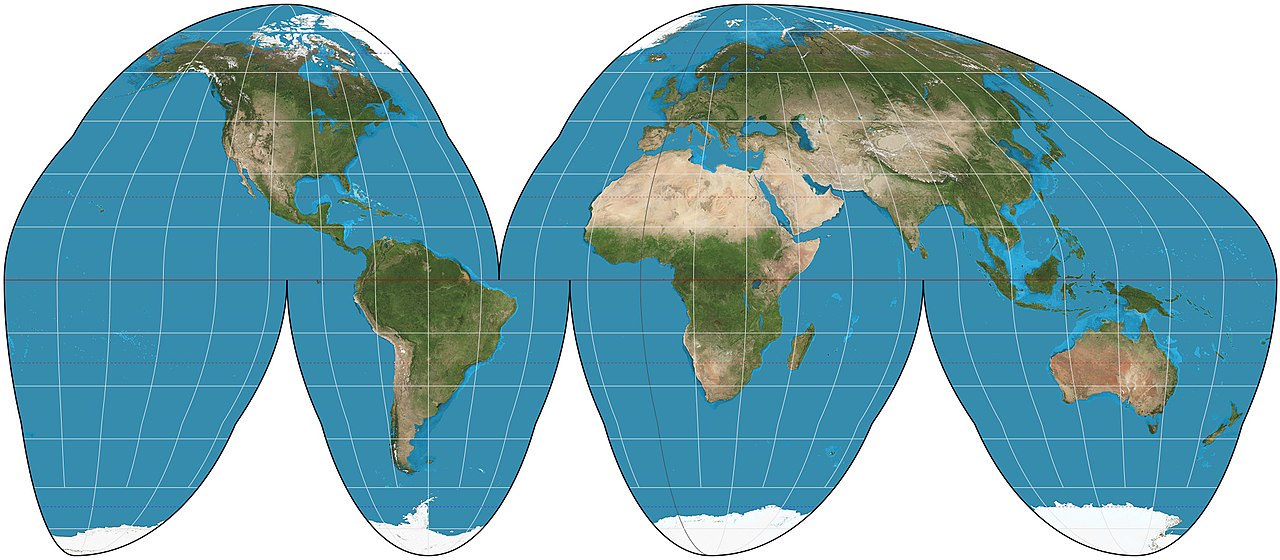
|
| An interrupted Goode Homolosine map of Earth. Daniel R. Strebe, Wikimedia |
In principle it may also be possible to create more complex composites with
wholly different projections for sections in different longitudes, in a way
that couldn’t be done with uninterrupted maps, but I don’t think I’ve ever
seen that done; composites are generally only cut together along
parallels.
G.Projector allows for some projections to be interrupted either with
popular configurations for Earth, or cut into regular “gores” spaced along
the equator (if you want to print out a map to wrap around a ball to make a
quick globe, a sinusoidal projection with thin gores would probably work
best), so by using different gore sizes and shifting the center longitude,
you can assemble the appropriate sections yourself interrupted map to suit
your world’s features. Though even without this feature you can take any
suitable projection and cut out the sections yourself, so long as you’re
sure to cut carefully to avoid having any repeated sections (if you don’t
want any). It may be easier to instead take a single input map and divide
that into multiple sections, with each placed in its own image with the rest
of the map left as some blank background color, and then individually
project each of those and reassemble them afterwards.
For the below map, I used a modest combination of cuts to preserve Teacup Ae’s landmasses:
- In the northern hemisphere:
- One large section from 180° W to 35° W above 60° N, then diagonally from (35° W, 60° N) to (10° W, 45° N), and along 10° W to the equator, projected centered on 90° W, which covers Steno and Holmes while the diagonal cut avoids Hutton.
- One from that slanted cut to 102° E, centered on 30° E, covering Hutton and north Lyell. Note how the central meridian here is a bit west of the center of the section, to minimize distortion of the northwest region of Hutton closest to the pole.
- One final cut from there to 180° E, centered on 135° E, covering north Wegener and the above ocean which would otherwise be more distorted if I left them attached to Hutton.
- In the southern hemisphere:
- One large section from 180° W to 35° E, centered on 45° W, covering Agassiz; perhaps a bit wider than would be ideal, but Agassiz's position makes that hard to avoid, and I didn't want to add small slivers just for the strips of ocean around it.
- One final section from there to 180° E, centered on 120° E, covering the bulk of Wegener.

I’m fairly pleased with the result, but it’s a bit too tedious of a process to do regularly; in the future I may attempt to add some function to projectionpasta to allow or automated production of maps with arbitrary interruptions.
Goode Homolosine

Equal-Area, accurate shape along equator
G.Projector uninterrupted or with various interruptions, MapDesigner
uninterrupted or with standard Goode interruptions, MaptoGlobe
uninterrupted
A composite of sinusoidal from the equator to 40.737° latitude, then
Mollweide from there to the poles. This gives good shape at the equator and
accurate east-west distances and parallel spacing at low latitudes, but
avoids the worst of sinusoidal’s shape distortion at high latitudes.

|
| The uninterrupted form |
It is shown almost exclusively in interrupted form, usually with the same set of interruptions suggested by Goode when he designed the projection, favoring shape on the inhabited continents—though as mentioned these have also been applied to other projections. He also proposed an alternate set of cuts to favor the oceans, though these are more rarely used. As mentioned above, I developed my own set of interruptions here for Teacup Ae’s particular landmass distribution.
Having equal area and accurate shape on the continents makes it ideal for
aspects of human or otherwise terrestrial geography where paths of travel
between continents isn’t important, such as maps of population density,
economic or political numbers, terrestrial biomes, etc. A common practice in
atlases or detailed wall maps is to have large main maps in some other more
continuous projection to show physical geography, and then smaller secondary
interrupted goode homolosine maps to display other information.
HEALPix

Equal-area
G.Projector, with configurable interruptions.
Short for
Hierarchical Equal-Area isoLatitude Pixelisation of a 2-sphere, it is
a composite of a cylindrical equal-area map to 41.81° latitude and an
interrupted
Collignon
at higher latitude (a triangular or diamond-shaped equal-area projection I
haven’t included on this list because it’s not terribly useful on its own).
This makes it something of hybrid of cylindrical and pseudocylindrical
projection, and while we’re at it we could also sort of consider it
polyhydral because the map could be folded up into a cube (though
technically the underlying construction is based on a
rhombic dodecahedron). Like Tobler Hyperelliptical, the name technically applies to a family of
projections with different aspect ratios and number of interruptions, but
the configuration above, with 4 slices in each hemisphere and an overall 2:1
aspect ratio, is the most popular.
This was developed for the needs of storing and displaying astronomical
data, for which purpose it was convenient to divide the sky into pixels of
equal area with a simple arrangement along straight parallels, but without
too much north-south or east-west squeezing near the poles, hence the
composite and interruptions. But the math of projecting our spherical
perspective of the sky is essentially the same as that of projecting the
surface of the globe, so this coincidentally made for a world map projection
as well, and it gained some interest from worldbuilders who want a map that
allows for fairly reliable local shape across the globe, even at high
latitudes and longitudes, without having to deal with the somewhat less
intuitive nature of transit across interruptions on a projection with a more
rounded profile, or the somewhat more arcane nature of projection with, say,
an icosahedral projection.
Azimuthal

A family of circular projections with generally more specialized use than cylindrical or pseudocylindrical maps. Each takes a single reference point, usually the north pole in the normal aspect, and then depicts all other points with accurate direction from that point along great circles; the correct azimuth, hence the name. With the north pole at the center, all meridians are straight lines pointing directly outwards, equally spaced in angle from the center, and all parallels are circles around the center, increasing in size towards more southern latitudes, with the south pole depicted as the largest circle, forming the perimeter of the map. All parallels and meridians meet at right angles, but forming a radial web rather than a square grid. Like cylindrical, the only real distinction between individual azimuthal projections is how the parallels are spaced.
Aside from uses focused on a single point—e.g. tracking travel or distance
from an important location—this also produces a world map with no
interruptions, because the outer perimeter represents a point in reality, so
it can also be helpful for tracking connections between all points on the
globe (though preferably without much passing near the opposite point to the
reference, which is generally true on Earth with little activity in the far
southern latitudes). And, also like cylindrical, the distortion properties
have no bias towards any particular longitudes.
But, once again like cylindrical, the main issue comes from the length of
parallels, which increases from the center. In the inner hemisphere, closer
to the reference point (so the northern hemisphere in normal aspect), this
somewhat but not exactly matches their real trend, so distance distortion
isn’t too bad, but in the outer hemisphere (the southern in normal aspect),
this causes increasingly extreme east-west stretching of features to more
southern latitudes, and thus generally worse overall shape farther from the
center. It's also worth noting that for people less familiar with seeing
different map projections, the orientation of different regions across the
map may be confusing. Even if the equator is placed across the center, areas
at the top and bottom of the map will be “inverted”, with south towards the
top of the map.
One common workaround is to use a two-hemisphere or bihemisphere map, splitting the world into halves that are each projected around their respective centers (typically the poles or somewhere on the equator).

|
| Bihemisphere projection of azimuthal equidistant |
This ensures that only the lower-distortion central hemispheres are used, and avoids having any “inverted” areas. But of course it somewhat obscures the relationship between hemispheres, so like interrupted pseudocylindrical maps these may be best used where you want to depict two primary regions of focus on either side of the world (like a “double eyeball” world) without much care for areas between them—and in this case you prefer consistent shape around these centers rather than straight parallels. G.Projector and projectionpasta both have options for bihemisphere maps for all their azimuthal maps (save gnomonic); MapDesigner outputs only single maps, but you can make two and cut them down to hemispheres on your own.

|
| Robinson map with two polar insets in azimuthal equidistant |
Most often azimuthal projections are used for smaller regions of focus. A particularly common practice is for a large compromise map to be accompanied by two inset azimuthal maps centered on each pole, helping compensate for the typically large distortion of polar regions in most other projection types.
Azimuthal Equidistant

Equidistant from center
G.Projector (as input and output), MapDesigner, projectionpasta, Wilbur
A fairly straightforward one to start with: parallels are evenly spaced, and
so all points are given their accurate distance from the map center. This is
of course good for understanding travel or other connections from that
point, but it’s also fairly intuitive, potentially convenient for data
reference like equirectangular, and tends to have decent shape close to the
center.
But it doesn’t mitigate the east-west stretching issues: relative to the
scale of meridians, all parallels are too long, but this increases from a
modest 11% extra length at 45° north, to 57% at the equator, to 233% at 45°
south, and the south pole is stretched from a single point to a circle with
twice the circumference of the equator. Area is correspondingly inflated by
the same amount.
Still, this is generally the most popular azimuthal projection, serving as
essentially the default choice from the group. It is famously used for the
UN flag, and rather less glamorously as the proposed appearance of a flat Earth by
conspiracy theorists.
A double-sided azimuthal equidistant map (with a hemisphere printed on
either side of a disk) was also
recently proposed
by a trio of cosmologists as an ideal map “projection” because the two sides
could be considered contiguous across their perimeter and so avoid the
typically high distortion of many maps towards their edges, and, well, this
frankly isn’t helping cosmologists escape the accusation that they have a
tendency to meddle in other fields without fully understanding their actual
needs.
Lambert Azimuthal Equal-Area

Equal area
G.Projector and MapDesigner listed as “Azimuthal Equal-Area”,
projectionpasta and Wilbur as “Lambert Azimuthal Equal-Area”
As cylindrical equal-area is to equirectangular, so Lambert azimuthal is to
azimuthal equidistant: To compensate for the east-west stretching away from
the center, parallels are squeezed together, preserving area throughout the
map, but the relative lengths and widths of areas in the far southern
latitudes are even more distorted, to the point of being basically illegible
close to the south pole. And, unlike cylindrical equal area, there’s no way
to shift the area of good shape away from the center.
Therefore, even moreso than azimuthal equidistant, it’s mostly used for
hemispheric or smaller maps, but it serves well there: distance and angle
distortion are quite low near the center, even over longer distances, so it
is one of the best options for regional maps, even as large as continents,
where accurate area and good overall shape are preferable to other
considerations like perfect distances, even parallels, or good shape for
distant outliers.
It also happens to accurately record all chord lengths from the
center, the actual distance between points on the surface through the
interior of the globe in 3-dimensional space, should that ever be
necessary.
Stereographic

G.Projector projectionpasta with adjustable outer perimeter, MapDesigner and
Wilbur in a single view
The azimuthal equivalent to Mercator: parallels are spaced out to ensure conformality, with perfect local angle everywhere, but this stretches north-south distances and exacerbates the east-west stretching as well, such that there is extreme ballooning of area towards the southern latitudes. Again like Mercator, a single world map in one projection isn’t possible, because the south pole is projected as infinitely far from the center; all maps have to be truncated at some latitude (those here are truncated at 60° south).
Still, like the other azimuthal projections it has decent overall shape in its inner hemisphere. It also uniquely preserves the apparent shape of circles anywhere on the map. This isn’t to say that circles are undistorted, as length along the perimeter can be altered, so for example a half-circle on the globe might be shown as covering more or less than half a circular arc on the map depending on orientation.

|
| A circle placed over the equator in azimuthal equidistant (left) projected into steregraphic centered on the equator (right), preserving the outline but not internal distribution. |
But regardless, this makes stereographic popular for maps of other bodies in the solar system, because craters remain recognizable across the map.
Vertical Perspective (Orthographic)

Accurate external perspective
G.Projector, MapDesigner, Wilbur as single orthographic maps or perspective
maps with adjustable viewer distance, projectionpasta as orthographic only,
MaptoGlobe and GPlates as interactable objects
Depicts the globe as it would appear to an observer in space. With vertical
perspective the appearance depends on the projected height of the viewer
relative to the globe. Orthographic projection shows the globe seen
from “infinite” distance, which is to say it doesn’t take limited
perspective into account but effectively shows what you’d get if you
projected from points on a globe directly onto a flat surface next to it in
space. The above map is orthographic, and below is a vertical perspective
from a height above the surface equal to the planet's radius.

As flat maps, they’re not terribly good: shape is good very near to the center of an orthographic projection, but areas near the edges are severely compressed, and only a single hemisphere can be shown. A bihemisphere map technically shows the whole surface, but much of the edges still remain basically illegible so you need at least 4 aspects (arranged tetrahedrally) to get a good look at all surface features. With a closer perspective, the visible portion of the globe decreases as parts become hidden by its curve.
The real utility, of course, is depicting the globe as a 3-d object that can
be turned to inspect different parts of the world, seeing them each at low
distortion, without involving any unintuitive transformations. This is
exactly what MaptoGlobe and GPlates do, as well as Google Earth and Blender
with a bit more setup. You can also use it for fun things like this spinning
gif of Teacup Ae I made from a sequence of slightly offset orthographic
maps:

Vertical perspective is useful largely just for showing the actual perspective of someone in space near a planet.
Gnomonic

Straight great circles
G.Projector with adjustable outer perimeter or in polyhedral variants,
MapDesigner and Wilbur in a single view
Possibly the oldest mathematically formalized projection of a globe onto a flat map. Depicts all great circles as straight lines; any straight path drawn between two points on the map is the shortest route between these two points on a globe. But these lines aren’t of accurate length and don’t all meet at correct angles, and in general shape distortion increases very quickly from the center. Even mapping one full hemisphere is impossible, as the equator is projected as infinitely distant from the poles. such that mapping just one hemisphere would require an infinitely large map; mapping the entire world in finite area requires at least 4 maps (here I've truncated the map at 30° north).
As a local map it can be useful to map flight plans, orbital flyover paths,
and missile tracks. But if that’s the primary concern, consider as well that
a line drawn in GPlates between any two points also follows a great circle,
so that may be an easier alternative that can then be exported to other
projections.

|
| An equirectangular map showing great-circle lines made in GPlates between possible sites for major cities. |
Perhaps the most common use of gnomonic today is as projections for the individual faces of polyhedral projections, as we’ll discuss later, where each polyhedral face can be small enough to avoid the worst of the distortion.
Pseudoazimuthal

A family of projections based on azimuthal projections but in practice used more like pseudocylindrical maps. All are constructed at least in part by taking the full surface of a globe and reducing the longitude or latitude values of all points, such that it can be treated as if it were only part of the world’s surface. That is then projected with an azimuthal (or other projection) like a partial world map, and the result is generally then stretched to a desired aspect ratio. The idea here is that this takes the low-distortion areas at the center of azimuthal map and attempts to extend them over the whole globe. That stretching adds some distortion, of course, but these maps still tend to have fairly decent shape across the full globe.

|
| Construction of the Hammer projection by squeezing, projection to Lambert azimuthal, and stretching. |
The general result usually resembles a pseudocylindrical map, with a horizontal equator and north pole on the top, but clearly distinguished by their curved parallels, which introduces some distortion of distances and orientation towards the edges, but better preserves local shape towards the poles. They are also used for much the same purpose, as equal-area or compromise world maps.
These are somewhat inconsistently categorized in different lists, you may
see them called “lenticular” (lens-like, having both curved
parallels and meridians) or grouped together with polyconic projections
because they can technically be constructed from conic sections, but that
doesn’t really reflect how they were developed and they don’t much resemble
most polyconic projections.
Hammer

Equal-Area
G.Projector as input and output, MapDesigner, projectionpasta, Wilbur
A fairly straightforward but effective application of the pseudoazimuthal
process: longitude values are first halved, treating the world’s surface as
if it were one hemisphere; this is projected to a Lambert azimuthal
equal-area map (usually centered on the equator); and then the result is
stretched to twice the width to “undo” the longitude halving (because all
regions are compressed and stretched equally, relative area is
preserved).
The result is another 2:1 ellipse map, similar to Mollweide. In comparison,
shape is better preserved near the map center and at high latitudes, but
there’s somewhat more stretching and squeezing of distances at the map edges
(much as Lambert Azimuthal has best shape in its middle). So far it hasn’t
been as popular as Mollweide, but has seen a range of uses, and use in
oblique aspects is notably common (where the straight parallels of Mollweide
are no longer a particular advantage).
I started using Hammer for continental maps of Teacup Ae because I wanted a
projection that was equal area, had good shape across a large portion of its
center, and that could be projected out of G.Projector in an oblique aspect
and then accepted back in as input. Now that I mostly use projectionpasta,
the last point is less important, and using Lambert Azimuthal directly might
be the better general choice, though it depends on the shape of the
continent, as the low-distortion area of Hammer is more of an extended oval
rather than a circle, so it may better suit more long and thin
landmasses.
Aitoff

Compromise
G.Projector as input and output, MapDesigner, projectionpasta
Another elliptical map made by the same approach as Hammer, but using the
azimuthal equidistant projection instead—though really it preceded Hammer
and is, so far as I can tell, the first proposed pseudoazimuthal projection.
Accurate distance from the center is preserved only along the equator and
prime meridian, so overall the map has no particular optimal property, but
it does have somewhat less local shape distortion towards the edges than
Hammer.
Just for completeness’ sake, the same pseudoazimuthal method can also be applied to the stereographic and orthographic projections, producing the elliptical pseudostereographic and pseudoorthographic projections (available in G.Projector and projectionpasta).

But there’s nothing particular to recommend about them and they’re not much used. Occasionally I’ve heard it said that pseudoorthographic allows for showing the whole world while retaining the “feel” of a round globe, but I don’t much see the appeal.
Winkel Tripel

Compromise
All out tools, also as input for G.Projector
A quite popular hybrid projection produced by taking the average of the
position of each point in Aitoff and equirectangular, and then stretching
the result to be slightly taller to give better local angles and shape to
areas at high latitude. This produces something quite similar to many
pseudocylindrical compromises, with a pole line and inflated area towards
the poles. But compared to something like Robinson—generally it’s main
competitor—the curved parallels allow it to retain better shape at high
latitudes, with less north-south stretching, without requiring substantially
worse area inflation or stretching of the low latitudes (though with a bit
more stretching towards the far east and west longitudes).
Overall it consistently scores quite well in measures of total distortion
compared to other common compomises, and it’s the current standard for
National Geographic’s world maps. I think I’d also call it my favorite
compromise, so I might use it more in the future.
Incidentally, Winkel also produced two pseudocylindrical projections with
this approach, Winkel I averaging equirectangular with sinusoidal
instead of Aitoff, and Winkel II using Apian II, and the later
Winkel-Snyder uses Mollweide.

All are available in G.Projector but none ever gained much popularity.
Wagner

All in G.Projector; II, V, and VIII in MapDesigner; VI in projectionpasta;
IV and VI in MaptoGlobe; IV and VII in Wilbur
A family of pseudocylindrical and pseudoazimuthal projections, all produced by reducing both longitude and latitude coordinates to treat the world’s surface as if it only covered a small section of the globe, and then projecting that out with a preexisting equal-area projection.

|
| Construction of Wagner VII (shown here by way of Lambert Azimuthal, but with a bit of different stretching this is effectively equivalent to using Hammer). Savric 2015 |
I-III use sinusoidal, IV-VI use Mollweide, and VII-IX use Hammer. For each source projection, three new projections are made by rescaling the spacing of parallels to optimize the result in different ways:
- I, IV, and VII are all are equal-area, with much the same advantages and disadvantages of most pseudocylindrical equal-area maps (north-south stretching at low latitudes and compression at high latitudes).
- II, V, and VIII have reduced north-south distance distortion but inflated area towards the poles, but limited to ensure that regions up to 60° latitude are inflated to no more than 20% more area relative to regions at the equator.
- III, VI, and IX have simple equal parallel spacing along the prime meridian (though the Hammer-derived Wagner IX has unequal spacing elsewhere).

The original maps all have a 2:1 ratio between the equator and prime meridian (thus Wagner I-VI are 2:1 overall but the curved polar line makes VII-IX a tad taller) but Wagner also suggested that the maps could be vertically stretched to further reduce shape distortion at mid-latitudes (which doesn’t affect the relative areas), and indeed Kavrayskiy VII which we saw before is equivalent to a vertically stretched Wagner VI.
None of these projections have individually seen terribly much use, with
Wagner VI being generally the most popular due perhaps to its simple
underlying formula (I used it for the header image here), but they give a
nice variety to choose from if you like the overall look of
pseudocylindrical/azimuthal compromises but want something other than the
usual options, and there are even more later projections based on slight
modifications of Wagner’s approach.
Strebe 1995

Equal-Area
G.Projector and MapDesigner as “Strebe Equal-Area”
A somewhat recent projection with an odd profile that takes the
partial-world projection approach of pseudoazimuthal maps and takes it a
step further: The world is first projected to an Eckert IV map, but then
this is treated as if it were a partial world map in Mollweide projection
and so projected back to spherical coordinates, and then finally projected
out again to a Hammer map. All these steps preserve relative area, and the
intention is to retain good shape over the inhabited continents by
displacing as much distortion as possible into the Pacific and polar regions
at the edge of the map (though on Earth poor New Zealand ends up caught in
the crossfire). Compared to something like Hammer it particularly keeps good
shape towards the corners of the map in areas like Alaska and Siberia,
though as a result there’s more stretching along the equator at far
longitudes and closer to the poles.
How well this works on other planets depends on how the landmasses are
arranged; a similar arrangement to Earth with long continents at mid-high
latitudes might suit this projection, but a more scattered distribution or
more land at low latitudes might not.
Conic

A small family of projections but with a lot of potential variants. As cylindrical maps are conceptually constructed by wrapping a sheet into a cylinder around the globe’s middle, these are made with a sheet tilted to form a cone. The surface of the globe is thus projected to a smaller area in one hemisphere (typically the north) and larger in the other.
The result is something of an intermediate between cylindrical and azimuthal
projections: all meridians are straight lines radiating out from the north
pole, and all parallels are partial circular arcs of increasing length
towards the south pole, always meeting meridians at right angles (of course
the aspect can be changed to place the “tip” of the cone at any point, but
this is more rarely done, because unlike azimuthal these projections don’t
necessarily retain good shape near that reference point). Unlike azimuthal
projections, direction from the center is no longer accurate, and the map
has to be interrupted at the antimeridian, but the stretching of east-west
distances from the center is less severe, and (depending on the exact
configuration) the orientation of compass directions across the map is more
consistent. In comparison to cylindrical, shape is better preserved in the
inner hemisphere but worse in the outer hemisphere, and parallels aren’t
straight but spacing is still even along their length (i.e. the distance
between any 2 parallels is the same at any longitude).
But really these are rarely used as full world maps, being preferred instead
for regional maps of continents or countries. For all conic projections, the
exact angling of meridians can be tweaked to preserve accurate local shape
along any 1 or 2 reference parallels, with generally good shape at other
latitudes near those parallels (note that this also alters the overall shape
of the map and how much it curves around at the top). General practice is to
choose a region of interest across some range of latitudes, place the
reference parallels to reduce distortion across that range, and then crop
the map to that region. The closer the reference parallels are, the less
distortion there will be between them, so this generally works best for
regions that are short in latitude, but these projections are still commonly
used for regions as large as whole continents.

|
| Albers conic projection of Holmes with reference parallels at 25° and 40° |
Of course plenty of other projections can use oblique aspects to place their low-distortion centers over regions of focus. But with normal-aspect conic projections the straight meridians and concentric-circle parallels make for an intuitive grid, such that it’s fairly easy to keep track of compass orientation and direction across the map, as opposed to something like an oblique azimuthal projection where graticules curve away in different directions across the corners of the map.

|
| Comparison of views centered on (105° W, 50° N) in the middle of Steno in Lambert azimuthal (left) and Albers conic (right). |
I also suspect that some of the historical appeal comes from the fact that conic projections are relatively easy to chart out and draw with simple drafting tools like a ruler and compass, because all graticules are straight lines or circular arcs with a common center, and determining position of any point on the map is a simple matter of angle and distance from that center (much the same is true of azimuthal and cylindrical projections, of course, but again conics offer something of a compromise of orientation and distortion, much as pseudocylindrical projections are more frequently used today). This matters less in the digital age, but may be worth bearing in mind if you want to make an in-setting map or draw a map on physical paper.
For ease of comparison, I’ll make all the example maps with reference parallels at 15° and 45° north, giving good shape across the lower to mid latitudes of Steno, Holmes, and Hutton.
Equidistant Conic

Equidistant from poles
G.Projector, MapDesigner, projectionpasta, Wilbur (buggy)
As with equirectangular and azimuthal equidistant, parallels are equally
spaced, giving accurate north-south distances, but in this case the
reference parallels also have accurate east-west distances along their
lengths. East-west distances are then compressed between these parallels and
stretched outside of them. If you have fairly close reference parallels, all
other distances in the region of interest will be not quite accurate but
pretty close, so this might be useful for navigation.
If you have a particular range of latitudes you want to look at, placing the
reference parallels 1/6 of that distance inside the northern and southern
edges of that range will minimize total area distortion across that region;
e.g. for looking at a region between 30° and 60° latitude, the reference
parallels should be at 35° and 55°.
Albers Conic

Equal-Area
G.Projector, MapDesigner, projectionpasta, Wilbur
Generally the most popular of the conics, particularly used for maps of the
US and Canada. The references have proportional east-west and north-south
scale, but regions between are stretched north-south and compressed
east-west; and areas outside are compressed north-south and stretched
east-west, to a fairly severe epect far from the references. Thus
large-scale distances and shape may not be as well preserved as with
equidistant conic, but area preservation may be preferable in many cases.
Technically Albers Conic only refers to equal-area conic projections with 2
reference parallels; with just 1, it’s Lambert Equal-Area Conic, not
to be confused with Lambert Conformal Conic, Lambert Cylindrical Equal-Area,
Lambert Azimuthal Equal-Area, or Lambert-Lagrance Conformal Polyconic;
Johann Heinrich Lambert was evidently a very prolific cartographer but not
an inventive namer. If you see a projection called just “Lambert” it’s
probably referring to Lambert Azimuthal.
Lambert Conformal Conic

Conformal
G.Projector, MapDesigner, projectionpasta, Wilbur
You can probably see the pattern by now: this is the conformal variant for conic projections, less popular than other conics for large maps but perhaps more suitable for local charts (though at small scale conic projections have less of a clear advantage over oblique cylindrical or azimuthal projections, as bending of the graticules will be slight regardless). Much as with stereographic, distortion tends to rapidly increase away from the north pole, with the opposite pole being infinitely distant so the entire world can’t be shown in one map (this map is truncated at 150° south). But in this case low distortion can be shifted with the reference parallels; regions in between these will be compressed in area, and regions outside will be inflated.
Pseudoconic/Polyconic

A diverse groups of projections based in some way on the basic principles of conic projection.
Pseudoconic projections are to conics as pseudocylindricals are to
cylindricals; start with a conic projection and then bend in the parallels,
which helps to reduce with area distortion without needing as much
north-south squeezing as Albers, but distorts angle and distances more
towards the edges of the map. They’re still generally asymmetric across the
equator like conics.
Polyconic projections essentially project each parallel as it’s own
conic projection, slightly different from its neighbors, and stacks them all
together, but using calculus to do this continuously rather than having to
actually deal with loads of projections. Rather than a circular arc, this
gives you something of a double-clamshell shape that’s symmetric across the
equator. These are a bit more suitable than conics for world maps, and tend
to have fairly good shape near the center, but often have extreme stretching
of north-south distances and area farther away, usually towards the far
longitudes but in some cases at the poles.
Polyconics used to be common for popular in the early 20th
century but have now been largely abandoned in many areas in favor of
pseudocylindrical and pseudoazimuthal alternatives, though a few
cartographers did continue to refine the approach. I suspect again that this
may be partially because, for most polyconics, all graticules are straight
lines or circular arcs (though now with different centers), making them
easier to construct with simple drafting tools, and this has become less
relevant in the computer age.
Some sources are a bit ambiguous about which projections should be counted
as pseudoconic or polyconic, and we might even classify some as
“pseudopolyconic”, so to keep things simple I’ll put them all in one
section.
Bonne (Werner Cordiform)

Equal-area, accurate east-west distances, equal parallel spacing, accurate shape along reference parallel
G.Projector, MapDesigner (MaptoGlobe has it listed but with no way to change
the reference parallel)
A variable projection that’s mathematically pseudoconic but is perhaps easier to think of as based on sinusoidal, with the parallels curved in order to have accurate shape along a desired reference parallel other than the equator (I used 45° north here), while still retaining accurate area across the map and accurate east-west distances along all parallels (and still even spacing between parallels, which are not all concentric circular arcs). This does tend to produce some substantial distortion of angles and diagonal distances towards the edges of the map, but it might be best used as a regional map, acting as somewhat the inverse of equidistant conic (which has accurate north-south distances but mostly inaccurate east-west distances) and so is perhaps better suited to regions that are tall in latitude and thin in longitude, or perhaps T- or L-shaped regions which can take advantage of the good shape along both the reference parallel and prime meridian.

Setting the reference parallel at one of the poles produces the Werner cordiform, which has accurate shape only at that pole but has the additional property that all distances from that pole are accurate (though that distance does not correspond to the direct line between them on the map except at the prime meridian, e.g. the shortest line from the north pole to New Zealand shouldn’t pass through India as the map makes it appear). Though really much of the appeal probably just comes form its heart-like shape.
Bottomley

Equal-Area
G.Projector
A variant on Bonne, but using elliptical rather than circular meridians to reduce some of the distortion towards the edges. It can also be optimized to reduce shape distortion at a reference parallel (45° north again here), but doesn’t fully eliminate it, and it also no longer has accurate east-west distance. This makes it a bit less attractive than Bonne for regional maps, but perhaps could be a decent world map for a world with a very asymmetric distribution of landmasses favoring one hemisphere.
Nicolosi Globular

Compromise, circular inner hemisphere
G.Projector, projectionpasta
A fairly popular projection for a large stretch of history. Almost
exclusively shown as one or two hemispheres, where it has a pleasing
circular profile and is relatively straightforward to construct: The equator
and central meridian are straight lines of equal length, and then all other
graticules are circular arcs with different centers, such that meridians are
equally spaced along the equator and all meet at the poles, and parallels
are equally spaced along both the central meridian and the perimeter of the
map.
There’s some stretching of distance and area towards the edges, but it
overall has actually quite good shape. It has somewhat fallen out of favor
know that various alternatives have been developed, and has something of the
opposite issue in the computer age, being quite mathematically complex to
implement. Still, it might be a good choice for intentionally archaic maps
or worlds with two areas of focus.
Extrapolating it into a single global projection is also
possible in principle, but so far no software supports this (and it would have much the same
issues as other polyconics more typically shown a global maps). As a lark,
though, I did decide to see what would happen if you applied the process for
pseudoazimuthal maps to Nicolosi Globe, producing what we might call a
pseudonicolosi projection:

The result turned out less weird than I expected, but otherwise doesn't have anything in particular to recommend it, being very similar to but probably marginally worse than Aitoff.
Other Polyconics

As mentioned there are a wide variety of polyconic projections that are notable mostly just for their historical use, without having much to recommend them over current projections, so I figured we’d do a bit of a lightning round here:
- American Polyconic: G.Projector, MapDesigner; Accurate north-south distance along prime meridian and east-west distances along all parallels, which are partial circular arcs. Good shape near the center but extreme north-south stretching towards the edges. Mostly used for local maps in somewhat the same role as transverse Mercator is used today, and though particularly popular in America, also somewhat regarded as the “default” polyconic projection.
- Rectangular Polyconic: G.Projector with adjustable reference latitude, MaptoGlobe with equator as reference latitude; Has accurate scale along the prime meridian and a single reference latitude (in both hemispheres), circular parallels, and meridians that meet all parallels at right angles. Again good shape near the center but stretching towards the edges, though somewhat less extreme at high latitudes. Similarly used for local maps, but a bit more widely.
- Van der Grinten I: G.Projector, MapDesigner, MaptoGlobe, Wilbur; Another transitional fossil somewhat like Miller and Gall, meant to resemble Mercator while having somewhat less distortion (though it’s still quite extreme towards the poles) and a circular shape that evokes the sense of a round globe. Used by National Geographic for a bizarrely long time. Van der Grinten also made 3 later similar projections, all in G.Projector.
- Lambert-Lagrange: G.Projector, MapDesigner, MaptoGlobe; A conformal projection of the world into a circle, save for at the poles, with much of the same distortion towards the poles you’ve probably come to expect for conformal projections.
- Eisenlohr: MapDesigner, MaptoGlobe; Another conformal projection, one of the few that can map the entire globe while being perfectly conformal at all points. Optimized such that area is the same at the outer perimeter, and it has the lowest maximum area distortion of any global conformal map, though it’s still quite high across much of the map.
Latitudinally Equal-Differential Polyconic (Hao)

Compromise
MapDesigner
Though polyconics have largely dropped from widespread use in the West,
China has had its own particular tradition of cartography for much of the
last century and they seem to have stuck with them for longer. Details on
most of these projections are a bit obscure in English sources (I’m not
entirely certain I’ve even got the right translation for the name here), but
this appears to be the most common for official maps. The underlying math is
fairly arcane, but overall it seems that in optimizing polyconic projections
for general use, they’ve converged on something like pseudoazimuthal
compromises like Winkel Tripel; in direct comparison, this has slightly
better shape towards the corners but a bit more area distortion.
It also has curved polar lines like some of the Wagners, but often its shown
with the “horns” sliced off to give straight edges. Transverse aspects of
this map have also become recently popular, emphasizing the orientation of
the landmasses around the polar regions.
Polyhedral

A family of somewhat more exotic projections, long loved by cartography nerds who can’t understand why the many interruptions and odd orientations might be offputting to laypeople.
These work by essentially approximating the spherical globe as a polyhedron. As a quick geometry review, polyhedrons all have:
- Faces, flat surfaces in the shape of a polygon (triangles, squares, etc.).
- Edges, straight lines connecting two faces.
- Vertices, points at the intersection of three or more edges, with an equal number of adjacent faces.
The world is split into sections and each projected onto one face of the polyhedron, and then the shape is unfolded to make a single flat surface. The shape of faces is retained, so in principle, all of these maps could be printed out, cut out along their perimeter, and folded back up into the original polyhedron.

|
| Construction of the Dymaxion projection by projecting the globe to an icosahedron and unfolding. Chris Rywalt, Wikimedia |
In almost all cases the edges follow great circles on the globe, and most polyhedral projections use some type of regular polyhedron, where all faces are the same size and shape, so the same type of projection can be used for all of them.

|
| Polyhedral projections with each of the five platonic solids, though in practice cube and dodecahedron projections are rarely used. J.J van Wijk 2008 |
Much like interrupted maps, then, this is essentially several partial world maps in different aspects glued together, and it has many of the same advantages and drawbacks: the projection of each face can be optimized for best shape, avoiding the distortion towards the edges of single global projections, but this inevitably introduces some interruptions between faces. The more faces the polyhedron has, the less distortion there will be within each face, but the more interruptions are necessary to flatten out the map.
But unlike interrupted pseudocylindical maps, the faces more typically have
oblique aspects and they can connect along any of their straight edges
rather than just the equator. This is perhaps both their main advantage and
disadvantage: the more oblique aspects and many faces allow for quite low
local distortion across all map sections, and the faces can be arranged to
better show the arrangement of landmasses across the globe beyond the usual
view in normal aspects—but this often places regions in odd orientations
that can be unintuitive to laypeople not used to oblique aspects, and this
is somewhat exacerbated by the many interruptions; where sections on an
interrupted pseudocylindrical map are always connected to their neighbors
along straight left-right lines, polyhedral maps can have much more complex
connections across interruptions. Some of the more complex polyhedrals also
have a fair bit of blank space between these interruptions, which might be
inconvenient for use in limited space on pages or small screens.
Thus, like interrupted maps, they’re perhaps best used as more of a niche
tool, ideal when you want minimum local distortion of regions of interest
across the globe (e.g., landmasses) without caring much about areas in
between (oceans) or consistent orientation. Though, polyhedral maps can
maintain better continuity than interrupted pseudocylindrical maps, so they
might be better where some connections between regions of interest should be
shown, e.g. for local trade routes or migrations.
This map of human migrations on Earth with the icosahedral Dymaxion projection (which we’ll look a bit closer at later) is I think one of the best examples of a good use case: the polyhedral projection keeps good shape across the continents and accurately shows the nearest connections between them, but ignoring the oceans avoids having to deal with the jagged outline and interruptions of the full Dymaxion map.

|
| Human migration map by Avsa on Wikimedia, with an inset I added of the full Dymaxion map, image by Daniel R. Strebe. The dotted lines across the north Atlantic are based on a now disfavored theory. |
Beyond the choice of polyhedron, there’s a fair few ways the exact implementation can vary:
For one, there are several ways to perform the individual globe-to-face
projections. Generally something like an azimuthal projection is used,
favoring low distortion within the face and being radially symmetric rather
than favoring one axis like a cylindrical or pseudocylindrical projection.
Conformal and gnomonic projections are popular, as in both cases these have
good local shape at their centers and the worst of the high distortion far
from that center can be avoided, but equal-area and compromise projections
are also possible, though equal-area is rather less popular here than for
most projection families because they tend to require some substantial
stretching and squeezing to fit the shape of each face. Note, though, that
while polyhedral maps are always continuous across their faces, some of
these properties may not perfectly carry across; conformal projections lose
perfect conformality at the vertices, and often have more overall distortion
close to them, and gnomonic projections depict great circles as straight
lines within faces, but bent where they cross edges between faces.
Second, the unfolding can be done in a few ways depending on where you “cut”
the polyhedron to unfold it, which might produce different shapes or
orientations of the map. The simplest arrangements cut along edges, keeping
each face intact, but you can also cut across a polyhedral face, splitting
it up into smaller sections to attach at different points to the rest of the
map. As with interrupted projections, you can even repeat the same section
across different points on the map if that’s convenient to your
purposes.
Finally, for many polyhedral projections there’s not a single obvious normal
aspect, so there’s a particular tendency to vary map aspect, particularly to
avoid placing interruptions or high distortion over land regions. The
vertices in particular tend to have high distortion and must all have
adjacent interruptions. You can imagine how if, say, you pushed down the tip
of a pyramid and wanted to flatten out the 4 triangular faces without
changing their shape, it would be impossible to avoid splitting them
somewhere around the tip—so to have
uninterrupted landmasses, all vertices should be places in the oceans, which
may require some tricky positioning.
This gives a lot of potential variety, and it’s common to see multiple named
projections that are essentially just slight variants on essentially the
same underlying process. But none of our tools allow for arbitrarily
combining different variations (MapDesigner does allow for arbitrary aspect,
and rearranging the sections is a simple matter of cutting and pasting) so
it is still worth reviewing the named options. But to keep things simple,
I’ll organize this discussion by the underlying polyhedron, and look only at
projections available in at least one of our tools.
Tetrahedral

Projections based on the tetrahedron, the simplest regular polyhedron, with 4 triangular faces (for TTRPG fans, this is essentially a d4). This makes for a simple unfolding with few interruptions, but also has large faces and so tends to display higher distortion than other polyhedrons.
There are a few common approaches to unfolding the tetrahedron: First, a simple triangular arrangement where all faces are kept intact and arrayed around a central face; then a rectangular arrangement can be achieved a couple different ways, either by splitting one face in half and rearranging the pieces to make a long rectangle with a 2.309:1 aspect ratio (equivalent to 4/√3), or by splitting pieces from two faces to make a bulkier short rectangle with a 1.732:1 aspect ratio (equivalent to √3). In principle you could also have a parallelogram with intact faces, but I don’t think I’ve ever seen this done. Any of these will necessarily create some awkward orientations over some part of the map, but at least on Earth it’s possible to do so without slicing apart any landmasses.

|
| From top to bottom: unfolding of a tetrahedron to make a triangular tetrahedral map; and rearrangment of the faces to make a long rectangular map; shorter rectangle; and parallelogram. |
Note that even though this gives a fairly simple shape like cylindrical, with simple wrapping from the left to the right side, the top and bottom of the map now also represent lines on the globe which wrap around in somewhat awkward ways depending on the particular arrangement.
But this wraparound also allows for tessellation: an entire second world map can be placed adjoining the map along any side, and this can be repeated infinitely in every direction to form an infinite canvas.

|
| An endlessly tessellated Lee conformal projection. Justin Kunimune, Wikimedia |
Aside from perhaps making for a neat wallpaper, you can also pick any suitably sized and shaped region of this canvas and extract that as a world map, in order to tune the exact layout and shape of your map beyond the simple unfolding arrangements.
MapDesigner is the only of our tools that supports tetrahedral projections, with some notable examples including:

- Lee Tetrahedral: Conformal, included in both triangular and short rectangular arrangements. Some significant inflation of area near the vertices but otherwise fairly good shape. Often shown centered over the south pole for some reason, which I kept here, and then for the rectangular arrangement I managed to find an aspect with decent shape over all the landmasses.
- Van Leeuwen: Equal-area, in short rectangular arrangement; I used the same aspect here as for Lee. Fairly substantial stretching and squeezing across much of the map.
- IMAGO: A compromise based on the Authagraph, a recent variant on tetrahedral projection that splits the 4 tetrahedral faces into 96 small, narrow triangles of equal area, then projects each face so as to retain the total area of each small triangle, before unfolding to a long rectangular arrangement with an oblique aspect to avoid cutting across any landmasses. Regions within each triangle don’t retain their shape relative to each other, so this is not quite equal-area but still fairly close, with generally good shape but still some clear stretching and slight area inflation close to the vertices. The actual algorithm for the original Authagraph projection isn’t publicly available, but the maker of MapDesigner created this close approximation using the same process and with much the same overall properties, which they call IMAGO (Infinitessimal Mutated AuthaGraph Offspring). I managed again to find a decent aspect to show all the landmasses to use for the header image of this section.
Cubic

Projections based on the cube, with 6 square faces (a d6). Though this seems like it should be fairly intuitive with its easily recognizable faces, it’s quite rarely used, perhaps because it’s in a somewhat awkward halfway place where faces are still large enough to have significant distortion towards their corners but there are enough interruptions now to make it difficult to avoid slicing through landmasses. The only option in our tools is in G.Projector as Gnomonic Cubed Sphere, though this does give you some convenient options for choosing exactly how to unwrap it.
If we keep this aspect with a square centered over each pole, we could slice
up each polar square into 4 triangles and arrange them to give a more
balanced arrangement with somewhat more consistent orientation than typical
for polyhedral projections.

You might notice that this gives it the same shape as HEALPix, and indeed HEALPix could also be folded into a cube, but generally isn’t counted as polyhedral as it doesn’t apply the same projection across all its faces.
Octahedral (Butterfly)

Projections based on the octahedron, with 8 triangular faces (a d8). These are quite popular because with they can be arranged to place two of the vertices at the either pole and the rest along the equator, creating something like a normal aspect with the equator following along four straight edges and each face having meridians as not-quite-straight lines and parallels along not-quite-circular arcs.
The octahedron is usually unfolded in one of two ways: First a
butterfly arrangement where one hemisphere (usually the north) is
kept mostly intact, while the other is split into 4 “wings” splayed out
around the center, which suits Earth’s arrangement with closer
clustering of continents in the northern hemisphere, though it does split
Antarctica into 4. Second, an M-shaped arrangement is sometimes used
with alternating connections across the north and south hemispheres, which
makes for a less clustered arrangement of regions (and somewhat
inconveniently widens the map) but keeps a more consistent orientation and
only cuts Antarctica into 3. Agassiz's awkward position makes either
arrangement projection a bit less attractive for Teacup Ae, but I could at
least avoid cutting through Lyell or Wegener by shifting the central
meridian slightly.

The options in our tools include 3 variants of simple octahedral projections:
- Cahill Conformal: MapDesigner; conformal as you might expect, in the butterfly arrangement. Apparently the first published version of an octahedral projection, aside from an earlier draft by Cahill with a compromise projection that has apparently been lost to history. Generally good shape but some significant area inflation very close to the vertices, I used it as the main map here.
- Cahill-Concialdi: MapDesigner; an alternate aspect and unfolding of the Cahill projection with several cuts across faces in order to rearrange the south pole into 3 lobes, giving better shape to the southern continents and only splitting Antarctica into two, and by chance it happens to work quite well for Teacup Ae as well (almost, I'd have to fuss with the aspect or shift the slices a bit to avoid cutting off Agassiz's southeast peninsula). Note that as implemented in MapDesigner, it’s slightly asymmetric.
- Gnomonic Butterfly: MaptoGlobe; an implementation of the butterfly arrangement with gnomonic projections, giving perfectly straight meridians within each face but a more noticeable kink across edges and more severe distortion near the hemispheres (MaptoGlobe also seems to have a bug that adds a small gap along the midline).
Several other similar projections are made with a truncated octahedron, where the vertices of a regular octahedron are essentially sliced off to make small square faces.
.png/500px-Truncated_octahedron_(green).png)
|
| The truncated octahedron. Cyp, Wikimedia |
Typically the truncated cubes are cut into triangles that replace what would be the corners of each face in a regular octahedral projection. This requires a few more small interruptions, though these can be made to avoid landmasses on Earth, and it substantially reduces the distortion near these corners.
- Waterman Butterfly: MapDesigner with optional inset, MaptoGlobe without; A compromise projection with overall low distortion even near the vertices, often shown with the pieces Antarctica cut out and rearranged into a single inset map. This of course doesn't work quite so well for Agassiz, but it's nice to have a good view of the south pole I suppose.
- Cahill-Keyes: MapDesigner; Another compromise with slightly different distortion patterns, but more distinguished by being more regularly shown in the M-shaped arrangement, often also with an assembled Antarctica, but here usually still attached to the bottom of the map.
Icosahedral (Dymaxion)

Projections based on the icosahedron, with 20 triangular faces (a d20). So many faces makes for quite low local distortion even with something like gnomonic projection, but requires many interruptions. However, the projection can arranged with a vertex at each pole and then unfolded with cuts only at high latitude, retaining a continuous strip of connected faces across the equatorial regions (and with gnomonic projections, it happens to have a straight equator).

But icosahedral projection is perhaps most famously used as the basis of the Dymaxion map, which manages to find a specific aspect and arrangement that avoids any cuts across major landmasses and even retains the closest connections between continents across narrow straits. This results in a fairly jagged outline, and good luck trying to guess where a ship or aircraft travelling over the edges of the map will end up, but it works well if only focused on landmasses, like the human migration map I showed at the start of this section.

|
| Justin Kunimune, Wikimedia |
Dymaxion is available in MapDesigner with its particular aspect and arrangement suited for Earth, and its particular projection of faces that retains distances along all edges.
G.Projector has a gnomonic icosahedron in the simple arrangement with
a straight equator that might be convenient for more general use in other
worlds (note that with this configuration and equilateral faces, the map
should have a width:height ratio of 11/(3√3), or about 2.117). But for fun,
for the main map here I had a go at making my own Dymaxion-like optimized
for Teacup Ae. Finding an orientation without vertices on land was quite
tricky, but then I projected the map with G.Projector and cut, rotated, and
pasted to get this configuration:

|
| Layout of my Dymaxion-like map, showing cuts along edges in blue and cuts across faces in red. |
Wilbur has a somewhat curious implementation (under Texture > Other Maps > Icosahedral Projection) which is essentially an equirectangular map with the top and bottom areas cut and squeezed to give the proper outline for an icosahedral map. It’s perhaps more properly an interrupted composite pseudocylindrical projection than polyhedral, but it may be convenient if you want something like this simple arrangement, with fairly little local distortion but straight and even parallels, easy connection across interruptions, and the potential to be cut out and assembled into an icosahedron.
Some TTRPGs have started using these maps because they can easily be split
into roughly equal-area hexagons (save for at the 12 vertices of the
icosahedron, which become pentagons), turning the world’s surface into an
easily managed game grid. Some video games have also started depicting game
worlds with geodesic grids, which are effectively the same in terms
of the arrangement of hexagonal (and pentagonal) tiles but graphically
stretched over a spherical surface.
Other

A handful of other projections that don’t neatly fit into any of the above categories but may still be useful for one or another specific use.
Peirce Quincuncial

Conformal (except at midpoints of each side)
G.Projector, MapDesigner
No, I don’t know how it’s pronounced.
Something of an intermediate between bihemisphere azimuthal projection and
polyhedral projection. Each hemisphere is projected into a square with a
modified stereographic projection that retains conformality everywhere
except the corners, and then one hemisphere sliced into four and arranged
around the other to create a single contiguous square.
You could also sort of think of it as a polyhedral projection onto an
octahedron squashed down flat. Compared to something like Cahill, it
similarly retains proper clustering of Earth’s northern landmasses while
showing the southern landmasses separated but with good shape, save for
Antarctica which is again split in 4—but here the northern hemisphere is
fully intact and has low distortion at the pole, but with more distortion
towards the equator and particular at the 4 corners of the square where the
equator bends at a right angle.
The square profile also allows for tessellation; a second map in the right orientation can be placed next to it with properly corresponding adjacent areas, and you can do this again infinitely out in any direction so that you could, say, chart out a path circling the world multiple times (this is also possible with the Lee world-in-a-tetrahedron projection above, incidentally). This also means the world can be cut up and pasted together in alternate ways, as with polyhedral projections; the diamond-shaped Adams and rectangular Guyou Hemisphere-in-a-Square projections are just different aspects and slicing of Pierce Quincuncial.

There are a particularly wide variety of named variants with different aspects or arrangements:
- Adams world in a square (G.Projector) is essentially the transverse aspect, with the same arrangement but centered on the equator. Adams I places the points at midpoints of the square and Adams II at the corners.
- Guyou (G.Projector as individual hemispheres, MapDesigner) splits the world into east and west hemispheres that are projected into squares and then placed side-by-side, creating a 2:1 rectangle.
- Spilhaus world ocean in a square (G.Projector) uses an oblique aspect that cuts mostly through land and so depicts the world oceans as nearly a single contiguous body surrounded by coastlines (with often a little cut-and-pasting around the edges to make it fully contiguous).
- Gringorten (G.Projector) is a more substantial variant, with the same shape and square hemispheres, but using an equal-area projection.

|
| Spilhaus world ocean in a square. map-projections.net |
Loximuthal

Equidistant along rhumb lines
G.Projector (listed on MaptoGlobe but with no way to adjust the
reference)
Takes a reference point (for once, usually not a pole) and shows the
shortest rhumb lines from that point to everywhere else on the globe as
straight lines with proportional lengths, and departing from the reference
point at accurate angles from each other. To be clear, because rhumb lines
are not actually straight on the globe, this does not imply the direction
from the reference to distant points is accurate, nor that the depicted
distance between points is accurate to the actual direct distance between
them. Rather, the direction to each point on the map is the same as the
compass bearing you could follow from the reference to reach them, and the
distance is proportional to the length of that path you’d follow.
Thus it’s somewhat ambiguous whether this could be counted as an azimuthal map, and it happens to have straight parallels so you might also argue it counts as pseudocylindrical. But at any rate, this might be convenient if you’re interested in, say, pre-modern shipping from a major trade hub. Here I chose a point at (0°, 45° N), which I marked on the map, that sits on a coast and might conceivably hold a major port.
Two-Point Equidistant

Equidistant from reference points
MapDesigner
Takes 2 reference points and accurately depicts the great-circle distances of all other points from those references. It does not necessarily accurately depict the exact direction from references, so probably can’t be counted as azimuthal, even though it’s naturally often compared to azimuthal equidistant. As a world map it makes for an ellipse elongated depending on the distance between the points, but it’s most often used for local maps of large regions with a longer axis, as it tends to have overall low distortion in the areas around and between the reference points even at fairly large scales; National Geographic often uses it for maps of Asia. Here I've chosen (and marked with dots) reference points at (120° W, 60° N) in central Steno and (45° E, 15° N) in north Lyell, a bit far apart for this projection but good for highlighting this long stretch of land across the north pole.
These last two types of projections are not currently available in any of
our standard tools, but I still thought they were worth including for being
fairly unique approaches that I might try to work out a way to use in the
future:
Chamberlin Trimetric

|
| Chamberlin trimetric map of Africa, with reference points marked. Daniel R. Strebe, Wikimedia |
This is an attempt to extend the logic of two-point equidistant to using 3 reference points, though it can’t be done perfectly; instead, every point is placed to minimize the error in distance from the 3 reference points (specifically, it basically applies two-point equidistant projection to each 3 pair of points and then takes the average of those projections). If placed reasonably close together (e.g. near the edges of a continent) this gives pretty low area and shape distortion around and between the reference points as well. But unlike two-point equidistant, a global map is not always possible, because some choices of reference point may cause distant parts of the world to overlap with each other. But of course this is mostly intended for regional maps, and is used by National Geographic for many of their continent maps.
It is available in QGIS/PROJ if you can get that working, and instructions
for a computational implementation for Chamberlin Trimetric are
available here, as well as for the similar
matrix trimetric projection here. To be honest, though, for continent-sized regions the result usually
isn’t that different from oblique Lambert Azimuthal or Two-Point
Equidistant.
Mesh-Based/Elastic
This is a class of projections developed by Justin Kunimune, maker of
MapDesigner, that eschews any simple mathematical principle of projection
for a more intensive computational approach. The globe’s surface is
approximated as a fine-scale mesh, and then cut along a few predefined
lines. The mesh is then smoothly deformed to make a flat surface, and this
deformation is optimized to minimize distortion across the map, based on
some mathematical defined measure of distortion. This can be tweaked to
favor lower area or angle distortion, and it can also be weighted to favor
lower distortion over specific parts of the surface, such as over land or
inhabited regions.
With a single cut along the antimeridian and no regional weighting, the
result appears similar to a pseudoazimuthal or well-optimized polyconic
projection.
As examples Kunimune gives Danseiji N, with roughly equal weighting or
area and angle, Danseiji I, optimized for minimum (but not strictly
zero) area distortion, and Danseiji II, optimized for minimum angle
and distance distortion.

But perhaps more interesting are projections with more slices and optimization to favor lower distortion over land areas. The result is something like a polyhedral projection, with generally good local shape at the expense of odd orientations and several interruptions, but here the projection isn’t bound to the particular geometry of a polyhedron or subject to the generally higher distortion near edges and vertices (and also has a rather nicer outline). As examples Kunimune gives Elastic I, a Dymaxion-like projection optimized for Earth’s land areas:

(He even conveniently includes a map of human migrations you can compare to the similar Dymaxion map I showed earlier.)

And Elastic II, optimized instead for the oceans, with the clever choice to slice the continents along major drainage divides:

The catch is of course that the optimization algorithm has to be run anew for any specific world. MapDesigner includes all these example projections (including several I glossed over that more aggressively favor land areas over oceans), of which Danseiji N, I, and II are agnostic to surface type and so could be used for any world, but the rest are all specifically optimized for Earth’s landmasses. The code for making new mesh-based projections is available, but would need to be modified for use on different worlds; perhaps it could make for a good supplement some day.
This all may seem like an imposing number of projections to sort through, so
to give you some basic advice to start out with, for world maps
Winkel Tripel (for general display use), Mollweide (where
accurate area is important), and equirectangular (for use with
software) should serve as a good set of defaults to start out with, and then
you can perhaps decide if you prefer the look of other
pseudocylindrical or pseudoazimuthal equal-area/compromise
projections, or even azimuthal or polyhedral projections if
you’re more comfortable with oblique aspects. For regional maps, you might
consider oblique Lambert Azimuthal or Hammer where accurate
area and best overall shape are preferable, or equidistant or
Albers conic if you prefer a more regular orientation and grid of
graticules, or perhaps occasionally two-point equidistant. If you
intend to draw anything on these maps that you might want to use elsewhere,
just be sure to keep track of which projections can be taken as input for
the software you’re using.
If, on the other hand, you want even more options to pick from, take a look
through the Baranyi, Canters, or Ginzburg series in
G.Projector, or the many variants on the Wagner projections.
Displaying Terrain
The other main subject I want to look at today is displaying terrain on flat
maps. We’ve of course worked with generating terrain before and a few ways
to map it, but even beyond dedicated topographic maps, terrain might still
be useful to indicate in some way because the positions of mountain ranges
and flat plains can still have great relevance to interpreting, say,
ecological or cultural features. We’ll go over a few options to choose from
depending on how prominently and in what way you want terrain to appear on
your map, and some software to help you do so, though mostly we’ll be
relying on Wilbur as it’s
a fairly good program for this sort of work which I've
talked about before.
Elevation Coloring
This approach is generally favored for maps intended to primarily display terrain: pixels on the map are colored according to their elevation (or outlined areas on vector maps). Perhaps the most straightforward version of this is a greyscale heightmap, where pixels are shaded from black to white on a generally linear scale corresponding to greater elevation.

|
| As examples for this section I'll return to this area of northwest Wegener |
This isn’t terribly readable to human eyes, but ideal for computer programs that can effectively treat the image as just a table of elevation values (without having to deal with obscure file types like netCDF that are just tables of values); it’s thus generally advisable to keep a “master” terrain map in greyscale, and use that to create other maps. Do be cautious about preserving color depth on this map: most images use 8-bit colors, which look fine to human eyes, but can only distinguish 256 steps of greyscale, so e.g. when linearly mapping an elevation range of 10,000 meters, each step would be 39 meters, so you’d miss a lot of detail in lowlands. Ideally you want to keep these maps in at least 16-bit greyscale, which can distinguish 65,536 steps of greyscale (so a resolution of 15 centimeters over the same elevation range). Many image editors and map projection tools only output 8-bit images; GIMP is a decent image editor that can retain and convert color depths, and I specifically designed projectionpasta to retain the color type of the input image (and of course Wilbur can also handle 16-bit heightmaps, and even some 32-bit formats).
At any rate, for actual display to humans it’s generally better to use a color elevation scale, shading through colors that more clearly stand out from each other to our eyes. A simple gradient between two colors is a bit more readable but still a bit hard to see much detail in:

|
| For simplicity I'll exclude the oceans from these early examples, and as discussed later I'm using an exponential scaling of elevation for color grading. |
We can improve on this by stacking multiple gradients together: here the lowlands shade from green to beige, and then the highlands shade from the same beige to brown; using the same color to link the gradients together ensures that the overall transition appears smooth.

Various gradients are used, I tend to use one based on this template on Wikipedia which is mostly constructed from three gradients on land (with a fourth between the two lowest land colors) and one in the oceans (and separate colors for land below sea level and lakes, though I’ve shown neither here to keep things simple).

It follows the common practice of using natural-looking greens and browns, which I sometimes worry might give a false impression of how vegetation and ice cover relate to elevation, but I trust you to know the difference. But really any colors could do so long as they’re sufficiently visually distinct; there are various repositories of decent gradients you can use, and really just about any image editing program has a gradient tool that you can use and sample colors out of, though note that while starker color gradients may make for clearer terrain, they can also obscure other symbols or text laid over them.
This gives a better impression of the overall features, but it can still be hard to read fine details. One trick that can help is dividing up the gradient into steps, each covering range of elevations in a single color.

The harder break between steps helps highlight the contours of the terrain better, but you lose all information about the terrain within each step. Thus, there’s some potential optimization between larger steps, which better highlight the major terrain features but obscure all detail, and smaller steps, which preserve more detail but have less distinct contours and so can slip back towards the same readability issue of continuous gradients.

|
| Stepped elevation coloring with half (left) and double (right) the elevation steps |
One important note here is that, while greyscale maps should generally have a linear relationship between greyscale value and elevation (so that any software can read elevation directly from them), for colored gradient maps one generally wants to favor lowlands more, to match the generally logarithmic distribution of terrain. Earth has peaks stretching to over 8 km, but half the land area is under 400 m, so any equal distribution of elevation across less than about 20 steps is going lump most of the landmasses into the bottom step—and at the other extreme, highlands often have slopes too steep to clearly distinguish small elevation steps anyway. The general approach is to skew the distribution of color steps, with each successive step above sea level representing a larger range of elevations. I’ve already been doing this with the above maps to show their best use, if I used a more linear distribution of colors (one per 450 meters here) you can see the issue:

A common approach is to use a constant step size for a few steps and then increase, to keep the threshold elevations to round numbers; e.g., a few steps of 100 meters, then several of 250 m, then 500 m, then 1000 m, etc. I usually prefer a continuously increasing step size following a quadratic curve; for most of this post’s maps, each successive step n has a maximum elevation of 25 * n2 on land , while sea steps progress by 100 * n2 (in contrast to the previous post where I used the same step sizes for land and sea.

One final note is that you can use multiple gradients to cover different types of terrain. Of course land and sea areas often use different gradients sharply divided at sea level, but it’s also common to use a different gradient for land below sea level, and one could also use distinct gradients for ice or different biomes, though you’d have to be careful about ensuring proper clarity in all cases.

|
| The northeast tip of Steno, with a separate grey color scale showing the elevation of the overlaying ice sheet (which I otherwise chose not to include in any of the maps in this post, I'm still fussing over some details there). |
Wilbur is the tool I've mostly used for this in the past, and I've gone over the basic options previously, but in short with the default Wilbur shader you can open Texture > Shader Setup, in the General tab choose Height Code to show only elevation coloring (or keep it as Lighted to retain the hill shading we'll discuss shortly), then in the Altitude tab configure the colors used, taking special note of Absolute Coloring to pin the color gradient to specific altitudes, the Lightness options you may want to set to 0.0 for Sea to avoid an additional lighting effect on ocean colors, and then within the Color List window the Gamma option which controls the scaling of the gradient to altitude; setting it to 2 on land and 0.5 at sea will give the same quadratic curve I've been using here, but you can play around with it to see what works best for you. In the same tab, setting Blending to None will give you the stepped elevation coloring, but Wilbur distributes these steps in a slightly inconvenient way that requires a bit of a workaround I described in the last post. When you have the desired result, use Texture > Save Texture As to save it (as normal save will save the heightmap).
To give me a bit more control over elevation coloring I've also made my own little tool, elevpasta. For now it's a little barebones and WIP; there's no sort of interface, it's just a python script (that also requires the numpy and pillow packages) that you have to open to edit the parameters, but I've left in some examples and comments to work by; essentially you write in lists of elevation steps and colors, set a few parameters (with options for layering different maps) and then it should convert a specified greyscale heightmap into a colored elevation map. I may or may not work more on this script in the future, I just figured I would make it available now that I've made it.
Of course, this all presumes you have a greyscale heightmap to start out with. If you're not making a fully detailed heightmap—or you're still working up to it—then you can make a basic elevation map with just a few elevation steps, that still largely evokes the general shape of the terrain. Much of the same basic principles in terms of colors and elevation scaling should still apply for that.
Contour Lines
This is an approach mostly popular with maps of smaller areas, though it has
generally become less popular as reliable color graphics and printing have
become available. A line is drawn along the map at a constant elevation,
showing the contour of the landscape in much the same way as the edges
between color steps in the previous maps.

|

|
| Closeup on the western tip of the above area. |
The main advantage of this approach is that it only uses a single color, leaving all others available for indicating other information, like biomes, countries or provinces, etc.

|
| Contours overlaid on a Koppen-Geiger climate map (at a slightly lower resolution due to koppenpasta's memory limitations). |
The disadvantage is that it can be sometimes hard to read at a glance. Looking at an isolated stretch of terrain, it can be hard to judge how high the elevation is or even which way the terrain slopes (one common worry people have at first is how to distinguish peaks from isolated basins, but in practice at least on land most terrain lacks fully enclosed basins due to the nature of fluvial erosion—though there are a few on this map just because it's a tad down-sampled from its original resolution and I haven't filled in lakes). There are a few potential approaches to help at least partially mitigate this. One is to highlight major elevation steps with a thicker line or starker color, making it a bit easier to read the overall trends but still giving detailed information with the smaller steps

|
| 1000 m contours emphasized |
You can also combine contours with elevation coloring:

Or color the contours themselves by elevation:

But of course that means the map can no longer as easily be combined with other colors.
Some maps also add numbered labels to the contours to show elevation, but I don't know of a tool offhand that can do this automatically.
Wilbur can do simple contours via Texture > Contour Shader (it may hang for a minute because it uses a weirdly small contour interval by default). If you then open Texture > Shader Setup... you can adjust the contour interval and coloring scheme.
And of course this is also possible to do to some extent by hand, and if you draw maps with vector graphics then you essentially are drawing contours to map terrain, though in that case they may not be evenly spaced in elevation.
Hill Shading
This is another particularly common technique across a variety of maps: The map is shaded to mimic shadows cast by its terrain, essentially tricking the eye to view the map as a 3-dimensional object.

Typically the map is effectively treated as if laid on a flat surface and lit from a uniform direction, rather than wrapped over a sphere, so for maps of large regions this isn’t necessarily a good depiction of how shadows should actually appear on the planet’s surface, but it’s more of an optical illusion to give an intuitive “feel” of the terrain than an attempt at strict realism. Shading also depends only on the relative height of features compared to their surroundings, so this just shows how rugged the terrain is rather than its actual elevation; a flat plain at 5000 meters will look the same as one just above sea level.
Thus this approach gives the least objective information about
elevation—there’s really no good way to tell how tall a mountain is from its
shading alone—but gives the most intuitive sense of terrain at a glance,
without the need to reference a key or see an area in greater context. So
it’s not really used on its own for terrain maps, but in combination with
the above techniques.

|
| Hill shading combined with elevation coloring (top), with contour lines (middle), and all 3 in combination (bottom) |
And because it’s a simple shading, like contour lines it can be used with other types of map information—if anything it’s even less obtrusive and easier to read in a busy map, so generally favorable if absolute elevation information isn’t important. Indeed this is probably the most common way to show terrain on maps, as subtle hill shading is often applied to political or other maps.

Wilbur applies hill shading by default when you open a heightmap. If you go to Texture > Shader Setup you can tweak the settings a bit in the separate tabs of the settings window: in General you can toggle between Lighted with shading or Height Code without; in Intensity you can adjust the exact lighting conditions; in Altitude you can add elevation coloring to layer shading over it, or if you want to shade some other map of the same region, in Blending you can select a texture image you want to shade, and set all the blending values to 0 except for the texture. Alternatively, you can set the altitude colors to plain white and save the texture, getting something like the first image in this section; if you then load that as a layer in an image editor and set the layer blending mode to multiply, this seems to get the same result, applying shading to the below image.
But while we're at it, Wilbur also supports a similar technique called texture shading. Here, rather than simulating lighting from a particular direction, each point on the map is tinted based on the relative elevation of other nearby areas; prominent peaks are lightened and valleys are shaded darker.

This can give you a slightly better sense of the terrain's texture on it's own, but it's perhaps best used in combination with hillshading. This is probably done best with exported layers outside Wilbur in an image editor, where you can make finer adjustments. In Paint.net in particular you can Adjustments > Curves to adjust the exact balance of shadows and lighting, and most editors should have similar tools. Here I've adjusted the texture shading to be somewhat lighter overall before combining it with hill shading (again using the multiple blending mode for both).

I suspect that what makes this effective is that texture shading is to some extent mimicking the soft lighting of real terrain by scattered and reflected light, as opposed to the harsh single light sources effectively assumed for hill shading. But if that's the case then there are other tools that can simulate a similar effect more directly:
Blender can be used to essentially model terrain as a real 3D object (see also here), properly modelling diffuse light over its surface, though it requires a fair bit of setup and so I haven't tried it myself here.
- Load a greyscale heightmap.
- If desired, in the color tab on the right you can load a color map for the terrain; otherwise set the color to white for a blank shaded map.
- For the image size on top, set it to the exact resolution of the heightmap.
- Open the camera controls tab at the bottom
- Ensure that you are in the "Orth" camera mode and looking directly down on the map.
- Set the Zoom to be equal to the image's vertical resolution
- At this point you may want to play around the lighting and camera settings and heightmap scale to get the desired shading.
- In the image tab on the right, set the width and height exactly to the map resolution
- When render to output, press render.

There are a couple more tools I've come across with their own particular approach to more advanced hillshading, though both require the rather esoteric ESRI .asc input format; this method using SAGA worked fine for me, but I found I needed to substantially reduce the terrain grid scale in these programs by a factor of around 0.001 (which they each have a tool for):
Pyramid Shader is a tool with a range of potentially useful functions, including Hypsometric Color for elevation coloring and Local Hypsometric Color which works like texture shading (both of which can be combined with regular hill shading). But one more unique tool is the Generalization tab which tries to emphasize the larger terrain features over smaller dips and hills.

Terrain Sculptor is a smaller tool for essentially removing detail on heightmaps to accentuate important ridgelines. You can do something similar with a simple blur of the heightmap or playing around with the generalization tools in Pyramid Shader, but this does it in a more advanced and tunable way. It doesn't give a particularly realistic sense of the terrain (and seems to have slight issues with steep coasts, maybe try a heightmap flattened over the oceans if you're not interested in bathymetry), but could be useful for more stylized or coarse maps or where you don't want to much distracting shading.

True hill shading on hand drawn maps is quite difficult to do, but I have seen some people use shading to give at least the impression of major ridges, and in general learning to do good shading is probably a worthy endeavor for any kind of hand-drawn art.
3D Modelling
This is one final approach which is quite evocative of the shape of the terrain, viewing it as a real 3D object, but doesn't necessarily work so well as a real map of the layout of the region. In Wilbur, you can access a 3d view of the terrain with Window > 3D Preview Window. To get a proper view you should first Surface > Map Info and make sure the edges of the map are set to match the heightmap's aspect ratio, and then in the 3D preview reduce the vertical scale until you get something recognizable. If you've set a proper vertical scale to the map's terrain, set the map edges to match the map's horizontal resolution, and know the relative horizontal and vertical scale of those units, you can even set the scale to give you a true or slightly exaggerated vertical scale. If I've set up my unit conversions right, this is northwest Wegener with 10x vertical exaggeration (with the standard elevation coloring):

Blender and Aerialod can also do this of course, though I'm not certain how to set up a real elevation scale in quite the same way, and Aerialod's surface smoothing doesn't hold up quite as well on close inspection.

Perspective maps are occasionally used for small regions, e.g. park hiking trails, so they may have some niche use there, or it may just be nice to see your terrain as a "real" object.
Other Mapmaking Software
To finish things off, I'll do a quick overview of some other mapmaking tools that didn't fit into any of the above categories (in no particular order):
- Watabou is a maker of lightweight browser map generators in a generally medieval/fantasy style. They’re not all necessarily terribly detailed or realistic, but may be a neat tool to have to hand for people running TTRPG games or the like.
- Inkarnate is a mapmaker designed for fantasy-style maps and TTRPG battle maps. Personally I think people are a little quick to recommend it for a broader range of tasks than it's really suited for, but it has its niche.
- Planet Painter is a somewhat stylized and buggy but functional tool for making simple maps on a globe.
- Planetmaker is a small browser tool for attempting to give a realistic appearance of a planet in space. It’s not quite perfect but fairly easy and quick to use.
- Metro Designer is a straightforward browser tool for making metro maps.
- MapChart is a tool for making maps of Earth with existing political boundaries, perhaps useful for mapping alternate history.
- Map Tailor is a tool for constructing zoomable tile maps that could be uploaded to web pages, though you'd have to figure out how to set up your own web page yourself.
In Summary
That’s where I’ll leave things off for now. There are a number of other topics in cartography we could discuss, such as making “true-color” maps, marking political, cultural, or economic features, mapping transit networks or hydrology, etc. But these will all take a bit more research and testing on my part, and I didn’t want to delay this or following posts too much more, so we’ll move on for now and leave those topics for supplemental posts in the future. The next posts in this series will move into the vast subject of natural resources, starting with biological resources such as crops and lumber (though there’s a couple climate explorations I may work on first). See you then.
- Digital map files can exist in a couple different formats:
- Raster graphics constructs images as grids of pixels, giving them limited resolution but easy handling of complex patterns and good compatibility with software tools.
- Vector graphics constructs images as lines connected by points and enclosing shapes, giving them much higher precision but more limited use.
- When working with raster maps, there are a few potential issues to watch out for:
- Color mode may be limited in some programs, limited the color detail available on the map, a particular issue for heightmaps.
- Compression in certain file types or when shared online may reduce obscure the original colors.
- Antialiasing during drawing and interpolation on resizing may blur colors and important boundaries.
- Projection from a spherical globe’s surface to a flat map can be done in various ways, all of which necessarily cause some distortion, but they can broadly be categorized by the way they optimize their distortion and how they’re constructed:
- In terms of distortion characteristics:
- Equidistant projections preserve relative distance from a reference point.
- Equal-area projections preserve relative area of regions.
- Conformal projections preserve local angles of intersecting lines.
- Compromise projections attempt to balance different types of distortion to preserve overall good shape.
- A few projections such as gnomonic or orthographic optimize for other traits.
- In terms of construction:
- Cylindrical projections show the surface as a rectangular grid, preserving general compass orientation and making for easy location of coordinates, but causing high distortion near the poles; good for software and data reference.
- Pseudocylindrical projections bend meridians to form an oval shape, reducing distortion towards the poles but increasing it towards the left and right edges; good for general-purpose world maps.
- Azimuthal projections show the surface as a circle around a central reference point, with low distortion towards the center but higher towards the edges; good for polar and regional maps with low distortion.
- Pseudoazimuthal projections bend meridians and parallels to fill a similar role as pseudocylindrical maps but with a different balance of distortion across latitudes; good for a similar range of general-purpose world maps.
- Conic projections show the surface as a circular arc around a pole, allowing them to optimize for low distortion within a given range of latitudes; good for regional maps with an intuitive orientation and regular grid.
- Pseudoconic and polyconic projections modify conic projection to display the surface in a range of shapes with bent meridians and parallels; generally less popular today than they used to be, but some may serve as good regional or world maps.
- Polyhedral projections project portions of the world onto the faces of a polyhedron that is then unfolded, giving good local shape across the world but many interruptions and odd orientations; good for world maps focused only on certain regions like land areas.
- A few projections like two-point equidistant have unique constructions that may serve specific purposes.
- Terrain can be displayed a few different ways to suit different purposes:
- Elevation coloring shows the clearest information on topography, but may be difficult to combine with other types of maps.
- Continuous color gradients show terrain in the most detail while being hard to read by eye, while stepped colors are clearer but less detailed.
- Contour lines show exact topography information while allowing for colors to be used for other purposes, but can be difficult to read at large scales or over rugged terrain.
- Hill shading gives an intuitive sense of terrain ruggedness while being easily combined with other map types, but doesn’t give clear information on exact elevation on its own.
- 3D models give an evocative impression of the shape of the landscape, but limited usable information on the exact terrain.
Notes
There was a lot of cartography drama in the 70s and 80s, as it turns out. A German filmmaker, Arno Peters, presented his projection (the Gall-Peters, a cylindrical equal-area with the reference latitude at 45°) as a superior world map to the then-popular Mercator because it was equal-area, and so didn’t inflate the size—and therefore apparent importance—of wealthier northern nations compared to poorer nations in the tropics. The cartography community acknowledged that the criticism was valid, but nothing new; many cartographers had decried the use of Mercator as a general-purpose world map and proposed equal-area or compromise alternatives, including Gerardus Mercator himself who preferred the sinusoidal projection for general use. Even Peters’ own map was an inadvertent copy of an earlier projection by Gall in 1855 (hence the two-barreled name). Peters ignored these responses, claimed that his map was the only “area-correct” map (and may also have made false claims that it was conformal and equidistant as well, my sources are a bit murky), and dismissed his critics as cultural imperialists. He managed to get his map into use by some schools and organizations, and ultimately a group of North American geographic institutions issued a statement in 1989 condemning the use of any rectangular projection for a general-purpose world map, which includes both Mercator and Gall-Peters. For my money, Gall-Peters is a pretty ugly projection.
Some more thoughts on the Mercator projection and cultural bias while
I’m at it: it’s often claimed that Mercator inflates the area of Europe
and the global north specifically, enhancing their apparent purpose. In
strict terms the projection doesn’t privilege either hemisphere; areas
further from the equator are uniformly inflated in either hemisphere
(though you do occasionally see some of Antarctica cut away from the
bottom of the map, leaving the remainder with a below-center equator and
so more of the northern hemisphere represented). The area inflation also
applies most to the highest latitudes, but, as is sometimes pointed out,
this doesn’t appear to have affected popular perceptions of the
importance of Greenland, Svalbard, or Antarctica.
That said, the naïve pupil can perhaps dismiss these areas as just
uninhabited wasteland regardless of size—and to an extent this can be
done for Alaska, northern Canada, and Siberia as well. With Antarctica
excluded, it just happens that the southern hemisphere has quite little
land area in latitudes as high as much as Europe. So an uninformed eye
may indeed look at the Mercator map and see an apparent depiction of a
large European continent befitting its perceived cultural importance,
some polar wastelands that may be vast but merit little attention
anyway, and moderately sized tropical continents that appear, at best,
similar to Europe in size, perhaps even less once further “wastelands”
like deserts and thick rainforests are excluded. And the choice to place
the northern hemisphere on top and slice the world map through the
Pacific rather than Atlantic are more clearly subjective choices that
bias a Eurocentric perspective (the latter is a somewhat more
justifiable choice in pseudocylindric or pseudoazimuthal projections,
where placing the largest ocean at the edges of the map reduces total
distortion over most land areas). So, as with many things, a system
lacking intentional bias in its design doesn’t mean it can’t be used to
further biased aims.
Regardless, there are plenty of perfectly sound cartographical reasons
to avoid using either Mercator or cylindrical equal area, except for
fairly specific cases.


.png)


Ah, what a nice day to check here again. :)
ReplyDeleteThis article was so peeakkk
ReplyDeleteHi, I'd like to know if you're planning to do an article on Tectolite? This new website to plate history
ReplyDeleteI don't know that there's enough to say about it to do a whole article, it has a lot of promise but I don't think it's quite viable yet as a full gplates substitute.
DeleteThe board game “Planet” uses dodecahedrons which are to be covered in pentagons:
ReplyDeletehttps://gizmodo.com/new-board-game-challenges-players-to-design-a-perfect-p-1834483160?_ga=2.220140633.1350798905.1556485269-229968814.1545242016
These pentagons are in turn composed out of five triangles each. So they should probably better be described as low pentagonal pyramids.
When you first show the finalized terrain map(this doesn't show up in any of the reprojections) I think there's an error with the gradient, above a certain point the himalayan-type range dividing Hutton and Lyell starts decreasing in elevation until the highest peaks are rendered as lakes.
ReplyDeleteIt's blogger's color compression, it makes the white mountain peaks the same color as the coastal seas
DeleteAh, that's a shame
DeleteIncidentally, it was because it is preferred for plate tectonic reconstructions I started using the Mollweide projection. In 1994 the geologist Steven Dutch made a series of such maps stretching 750 million years back. About ten years later I downloaded his “present” map from his website. I erased the text and made all the differently coloured fields white. The resulting world map I later used as a guide for my fictional ones. If you are thinking in terms of continental drift or even plate tectonics it is actually useful. Moreover, the parallels are strait lines making it relatively easy to place the climate/vegetation zones.
ReplyDeleteChris Wayan’s world maps are in the Winkel Triple projection. I consider it impressive that SiriusCb has managed to turn these into the Equirectangular projection:
Deletehttps://www.deviantart.com/siriuscb/gallery/87473063/maps-from-chris-wayan-of-world-dream-bank
You should probably put a separate page for all the final products like maps and systems, because right now I have to dig to find information.
ReplyDeleteProbably not a bad idea really, I've been meaning to do a little bit of a site reorganization for a while and also been thinking of doing a little side series looking at each of the continents of Teacup Ae in more detail once I've got the exact terrain locked down
DeleteSo will you put final maps in a dedicated page?
DeleteAnd I thought the terrain was already perfect.
DeleteI thought the Mercator projection stated being used in education because it was already easily available:
ReplyDeletehttps://blog.ifraagasaetterskan.se/Mathematics-works#wbb1
However, it could well have led to people overestimating the size if Siberia. I have read it is imagined to take months to travel trough. Do you know how long time it takes to travel from Moscow to Vladivostok by the Trans-Siberian railroad? No more than six days! If there was highway all the way it would take about two weeks by car. Which is incidentally the same amount of time as it took when they still used stream engines. Anyway, I don’t think there is highway much of the way since most of Siberia is so sparsely populated. Much of it probably only have dirt roads which are seasonally unusable.